
Construction workforce intelligence is the systematic collection, analysis, and application of workforce data across projects to give construction companies real-time visibility into labor availability, skills, certifications, productivity, and compensation pressure — so staffing gaps get caught before they stall a job. Platforms like CHERP and SiteComm from Debecorp operationalize this intelligence directly at the jobsite level, turning attendance logs, credential profiles, and crew communication into decision-ready signals.
The immediate payoffs for project teams:
- Predict staffing gaps weeks before mobilization, not after the schedule slips
- Improve bid accuracy with real labor pool data instead of gut estimates
- Reduce turnover risk by spotting compensation misalignment early
- Speed mobilization by knowing which certified trades are actually available
More than half of construction sites continue to rely on manual headcount tracking and paper processes, which creates operational exposure and highlights the need for workforce intelligence tools.
Table of Contents
- What is construction workforce intelligence, and why does it matter now?
- How does workforce intelligence actually work on a construction project?
- What KPIs should your team actually track?
- What are the real benefits, and where does ROI show up first?
- How do you implement workforce intelligence without a six-month IT project?
- What should you look for in a workforce intelligence platform?
- What are the limits, and what compliance issues should U.S. firms know about?
- How Debecorp’s CHERP and SiteComm operationalize workforce intelligence
- Key Takeaways
- The part most firms get wrong about workforce intelligence
- CHERP and SiteComm give your crew the intelligence layer it’s missing
- Useful sources and further reading
What is construction workforce intelligence, and why does it matter now?
Workforce intelligence covers more than headcount. It spans availability by role, active certifications, productivity signals, and real-time compensation pressure in local labor markets. For a GC or subcontractor, that scope translates directly into fewer failed offers, tighter bid assumptions, lower schedule risk, and better superintendent productivity.
The market pressure to adopt is real. The global construction software market is projected to reach $47 billion by 2030, growing at approximately 15% CAGR, as digitization and labor shortage pressures accelerate adoption. Meanwhile, integrated platforms are shifting the industry away from fragmented manual tracking toward centralized, AI-enabled intelligence layers.
For construction specifically, that strategic shift hits hardest in the credentialing layer. Electricians, pipefitters, and boilermakers aren’t interchangeable with general labor. Their supply is constrained by the credentialing pipeline, and no amount of headcount data tells you whether the right certified trades will be on-site when you need them.
How does workforce intelligence actually work on a construction project?
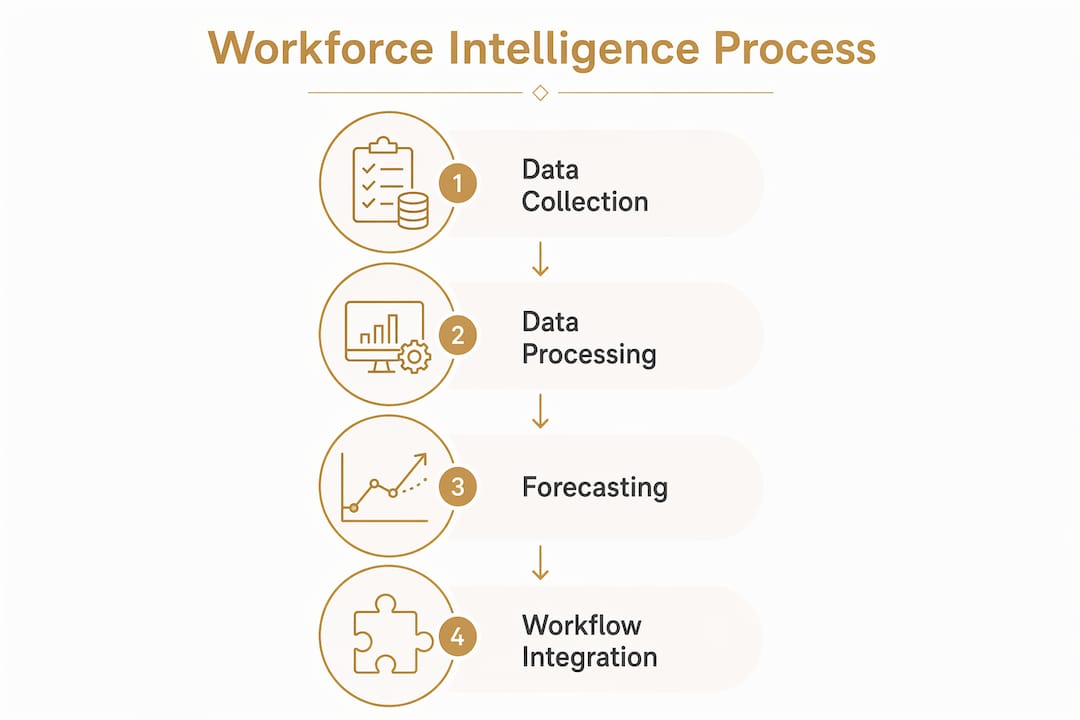
The raw inputs come from sources most firms already have but rarely connect: mobile attendance tracking, payroll exports, subcontractor daily logs, union and credential rosters, applicant flow data, and local market compensation feeds.

The processing layer normalizes those inputs into role-specific pool depth, market velocity calculations, and forecasting models. Short-horizon models flag operational risks a few weeks out. Strategic models extend to 60–90 days before mobilization, giving project executives time to act on comp plan adjustments or targeted sourcing before the problem becomes a delay.
| Forecast Horizon | Typical Lookahead | Primary Output |
|---|---|---|
| Operational | 2–4 weeks | Pre-mobilization alerts, daily availability flags |
| Strategic | 60–90 days | Bid validation, ramp planning, sourcing triggers |
Those outputs map to four concrete workflows: pre-mobilization alerts, bid validation, ramp planning, and offer compensation adjustments. Emerging capabilities like fatigue detection and automated compliance are beginning to appear in more advanced platforms, adding safety and regulatory signals to the same intelligence layer.
What KPIs should your team actually track?
| Metric | Definition | Operational Trigger |
|---|---|---|
| Role-specific pool depth | Available certified workers for a given trade in the local market | Pool depth drops → launch targeted sourcing 60–90 days before mobilization |
| Time-to-fill | Days from open req to accepted offer | Rising trend → review comp benchmarks and sourcing channels |
| Turnover rate | Annualized separations as a % of headcount | Spike → investigate comp gaps or site conditions; see labor turnover benchmarks |
| Utilization | Billable hours vs. scheduled hours by role | Below target → check scheduling accuracy and absenteeism patterns |
| Forecasting accuracy | Predicted vs. actual headcount at mobilization | Persistent miss → audit data source completeness |
| Accepted-offer delta | Difference between offered comp and market rate | Negative delta → adjust offer strategy before the next requisition |
Measurement cadence matters as much as the metrics themselves. Pool depth and time-to-fill should be reviewed weekly on active projects. Turnover and utilization work well on a monthly cycle. Forecasting accuracy is worth a formal quarterly audit, especially after a project where the model missed. Data quality checks — verifying that credential records are current and subcontractor logs are actually flowing — should run on the same cadence as the metrics they feed.
What are the real benefits, and where does ROI show up first?
The fastest wins tend to cluster around three use cases.
Bid validation and pre-bid labor assessments are where workforce intelligence earns its keep earliest. Feeding real pool depth and market velocity data into an estimate replaces the “we’ll figure out staffing later” assumption that quietly inflates risk on fixed-price bids.
Mobilization risk alerts are the second quick win. Knowing 60–90 days out that certified pipefitters are constrained in a given market gives a project team time to negotiate with a staffing partner, adjust the schedule, or pre-qualify additional subs — none of which is possible if the signal arrives two weeks before start.
Retention and recognition programs take longer to show up in the numbers, but the data is compelling. Workforce intelligence-driven recognition programs, where consistent performance data feeds peer recognition and manager acknowledgment, measurably reduce the likelihood that skilled workers leave within two years. For trades with long credentialing pipelines, keeping a journeyman electrician is worth far more than the cost of a recognition platform.
Accepted-offer rate is the easiest metric to start measuring immediately. It requires no new data infrastructure, just a disciplined record of offers made versus offers accepted, matched against the compensation delta. That single number tells you whether your comp intelligence is working.
How do you implement workforce intelligence without a six-month IT project?
The sequence that works in practice: define the two or three decisions you want to improve first (bid labor assumptions, mobilization timing, offer acceptance rate), then inventory what data you already have versus what you need to connect.
A pilot scoped to one or two active projects typically runs 8–12 weeks. That’s enough time to validate the data pipeline, build a dashboard or alert layer, and measure whether the model’s forecasts match what actually happened at mobilization.
Pro Tip: Start with time and attendance and credential data — they’re the highest-signal inputs and usually the easiest to centralize. Don’t wait for a perfect data set; a clean feed from two sources beats a messy feed from ten.
Common pitfalls to avoid:
- Data silos between badge systems, subcontractor logs, and PM tools are the most common failure point. Addressing information silos before the pilot starts saves weeks of cleanup later.
- Credentialing blind spots occur when the model treats all workers as equivalent. Role-specific credential fields are non-negotiable for licensed trades.
- Over-reliance on raw headcount without skill-level detail produces forecasts that look accurate but miss the actual constraint.
Cost considerations split into two buckets: integration work (connecting existing systems) and platform licensing. Integration is usually the larger upfront cost; licensing scales with seat count and feature depth.
What should you look for in a workforce intelligence platform?
Feature checklist for field operations:
- Role-based trade profiles with active certification tracking
- Mobile attendance with offline-first capability for remote jobsites
- Subcontractor log ingestion and normalization
- Compensation intelligence feeds benchmarked to local markets
- Real-time labor pool signals with configurable alert thresholds
- Dashboard views scoped by project, trade, and geography
- Privacy controls with least-privilege access and encrypted data transport
Questions worth asking in every vendor demo:
- How does the system ingest subcontractor data — manual upload, API, or direct integration?
- How are credentialing pipelines tracked, and what happens when a certification expires mid-project?
- What payroll and applicant tracking system integrations exist out of the box?
- Does the worker-facing UX work on Android without reliable connectivity?
- How are role-specific pool depth calculations sourced and updated?
Deployment model and worker-facing UX deserve more attention than they usually get in procurement conversations. A platform that field crews find confusing or slow will produce incomplete attendance and log data, which degrades every forecast downstream. Field worker productivity tools built with tradespeople in mind tend to see significantly higher adoption rates than those designed primarily for back-office users.
What are the limits, and what compliance issues should U.S. firms know about?
Workforce intelligence is only as good as its inputs. The most common limitations in practice:
- Incomplete credentialing data, especially for subcontractors who manage their own rosters
- Lagging market compensation feeds that reflect conditions from 60–90 days ago
- Subcontractor blind spots when subs don’t share daily log data
- Headcount-only models that miss skill-level constraints entirely
Mitigation tactics: build integration layers that pull subcontractor data automatically rather than relying on manual submissions; add role-specific credential fields to every worker profile; run periodic human validation of forecast outputs against actual mobilization results; and apply conservative confidence bands to any forecast built on less than three months of clean data.
On the compliance side, U.S. firms handling personally identifiable employment data need to account for applicable state privacy laws — California’s CPRA being the most demanding — as well as EEOC guidelines when using workforce analytics in hiring decisions. Least-privilege access controls and encrypted transport and storage are baseline requirements, not optional features.
This article provides general information about workforce intelligence practices. Consult qualified legal and HR counsel for guidance specific to your organization’s situation and jurisdiction.
How Debecorp’s CHERP and SiteComm operationalize workforce intelligence
CHERP and SiteComm were built from the ground up with input from tradespeople, which means the data they generate is structured around how field operations actually work rather than how back-office systems expect them to work.
CHERP features that map directly to workforce intelligence inputs:
- Time and attendance with trade-specific profiles and role-based admin
- Daily logs capturing productivity signals at the crew level
- Credential and certification tracking built into worker profiles
- Safety compliance records tied to individual workers and roles
- Per-trade field calculators that add context to utilization data
SiteComm adds the communication layer: jobsite chat, peer recognition, and worker-owned social features that generate the engagement signals workforce intelligence models use to flag retention risk before it becomes turnover.
Consider a scenario where a mid-sized electrical subcontractor is staffing a commercial project with a 90-day mobilization window. CHERP’s credential profiles show that three of the eight journeyman electricians on the planned crew have certifications expiring within 60 days. SiteComm’s engagement data shows two of those workers have been less active in crew communication over the past three weeks. That combination of signals — credential risk plus engagement drop — surfaces a targeted sourcing and retention action 60–90 days before it would otherwise appear as a mobilization delay.
Centralizing crew updates through a single platform like SiteComm also reduces the miscommunication that distorts workforce data — when crews report through multiple channels, attendance and log data fragments in ways that make forecasting unreliable.
Key Takeaways
Construction workforce intelligence works when it connects field-level data — attendance, credentials, productivity, and engagement — to forward-looking forecasts that give project teams 60–90 days to act before a staffing constraint becomes a schedule problem.
| Point | Details |
|---|---|
| Define the decision first | Identify two or three specific decisions (bid assumptions, mobilization timing, offer rate) before building any data pipeline. |
| Credential data is non-negotiable | Role-specific certification tracking separates a useful model from one that misses the actual constraint for licensed trades. |
| 60–90 day forecast horizon | Strategic forecasting 60–90 days out gives project executives time to adjust comp, source talent, or renegotiate scope. |
| Pilot in 8–12 weeks | A scoped pilot on one or two projects validates the data pipeline and forecast accuracy before a full rollout. |
| Debecorp’s CHERP and SiteComm | CHERP and SiteComm connect attendance, credentials, and crew communication into a single intelligence layer built for the trades. |
The part most firms get wrong about workforce intelligence
The conventional pitch for workforce intelligence focuses on dashboards and forecasts. What actually determines whether it works is something less glamorous: whether the data coming off the jobsite is clean, consistent, and trade-specific.
Most implementations that underdeliver do so because they centralized the wrong data. Headcount from a badge system looks like workforce data. It isn’t. It tells you how many bodies badged in, not whether the right certified trades showed up, whether they’re engaged enough to stay through the project, or whether the comp offer that closed them was already below market when it was made.
The firms that get the most out of construction labor analytics are the ones that treat credential tracking and worker engagement as first-class data sources, not afterthoughts. That’s exactly why Debecorp built CHERP with trade-specific profiles and SiteComm with worker-owned community features. The intelligence layer is only as good as the field layer underneath it. Get the field layer right, and the forecasts follow.
CHERP and SiteComm give your crew the intelligence layer it’s missing
Debecorp built CHERP and SiteComm specifically for the trades — not adapted from generic HR software, but designed from the field up. CHERP captures the attendance, credential, and productivity data that feeds a real workforce intelligence model. SiteComm adds the engagement and communication signals that tell you whether your crew is at risk before the turnover shows up in a report.

For construction companies and subcontractors ready to move from manual tracking to a data-driven construction workforce, CHERP and SiteComm are the starting point. The platforms handle time and attendance, daily logs, safety compliance, credential profiles, and crew communication in one place — on Android, with offline capability for jobsites where connectivity is unreliable.
See how CHERP and SiteComm work for your trade at debecorp.com/product, or explore trade-specific features for your crew.
Useful sources and further reading
- Construction Workforce Intelligence Software — Carlsquare: Market overview covering manual tracking prevalence, software market projections, and the shift toward integrated platforms.
- Carlsquare Construction Workforce Intelligence Report: Detailed report on platform capabilities, emerging features (fatigue detection, automated compliance), and market dynamics.
- Workforce Intelligence for Construction — AlphaHire: Covers credentialing pipeline constraints and role-specific tracking for licensed trades.
- Workforce Forecasting Platform — AlphaHire: Explains the 60–90 day forecasting methodology and compensation intelligence for offer management.
- Construction Workforce Intelligence — Timechamp: Practical definition and use-case overview for project teams.
- Gallup — Recognition and Retention Research: Foundational data on how recognition programs reduce two-year turnover risk.
- What Is Construction Workforce Planning? — Debecorp Blog: Connects workforce intelligence to strategic planning and HR partnership.
- Labor Turnover in Construction: Benchmarks — Debecorp Blog: Turnover benchmarks and action plans for subcontractors.
- Labor Productivity Tracking for Construction Managers — Debecorp Blog: Ties productivity KPIs to workforce intelligence ROI.
- How AI Tools Simplify Project Planning — House A-Z: External perspective on AI-assisted planning and its role in workforce forecasting workflows.