
Field worker productivity tools are software platforms and technologies that help managers track, measure, and improve what field teams actually accomplish on the job. The best ones do two things at once: they capture real-time data from the field and turn that data into decisions. Without them, supervisors are flying blind, relying on phone calls and paper logs to piece together what happened hours ago.
The metrics that matter most in field operations are not about screen time or app usage. They center on outcomes: did the job get done, did the worker arrive on time, and did the first visit actually fix the problem? Key productivity metrics include:
- Task completion rate: percentage of assigned jobs finished within the scheduled window
- First-time fix rate: how often a technician resolves an issue on the first visit, without a callback
- Travel-to-service ratio: time spent traveling versus time spent working at the job site
- Average job time: mean duration from arrival to completion, used to spot outliers
- SLA adherence: whether service-level commitments are met on time
- Compliance check rate: percentage of required safety or regulatory steps completed per job
Tool categories that support these metrics span five main areas: work order and task management platforms, real-time GPS tracking and geofencing, scheduling and route optimization software, communication and collaboration apps, and analytics and reporting dashboards.

Key productivity metrics every field manager should track
Metrics only drive improvement when they connect directly to your operation’s goals. A utility crew has different priorities than a sales team, but both need a clear picture of productive time versus wasted time.

Task and job completion rates are the baseline. Calculate them by dividing completed jobs by assigned jobs within a period. A drop in this rate usually signals a scheduling problem, a training gap, or a tool failure, not a motivation issue.
Travel-to-service ratio is arguably the most diagnostic KPI in field operations. If a technician spends four hours driving and three hours working, you have a routing problem, not a staffing problem. Tracking this ratio weekly reveals whether route optimization is actually working.
| Metric | How to calculate | Why it matters |
|---|---|---|
| Task completion rate | Completed jobs ÷ assigned jobs × 100 | Reveals scheduling and capacity gaps |
| First-time fix rate | First-visit resolutions ÷ total service calls × 100 | Directly tied to customer satisfaction and cost |
| Travel-to-service ratio | Travel time ÷ total work time × 100 | Identifies route inefficiency and wasted labor |
| Average job time | Total job minutes ÷ number of jobs | Flags outliers and informs future scheduling |
| SLA adherence | On-time completions ÷ total SLA commitments × 100 | Tracks contractual and regulatory compliance |
| Compliance check rate | Completed compliance steps ÷ required steps × 100 | Critical for regulated industries |
First-time fix rate deserves special attention because it compounds. Every repeat visit costs travel time, labor, and customer goodwill. Improving this rate by even a few percentage points across a large team produces measurable cost savings.
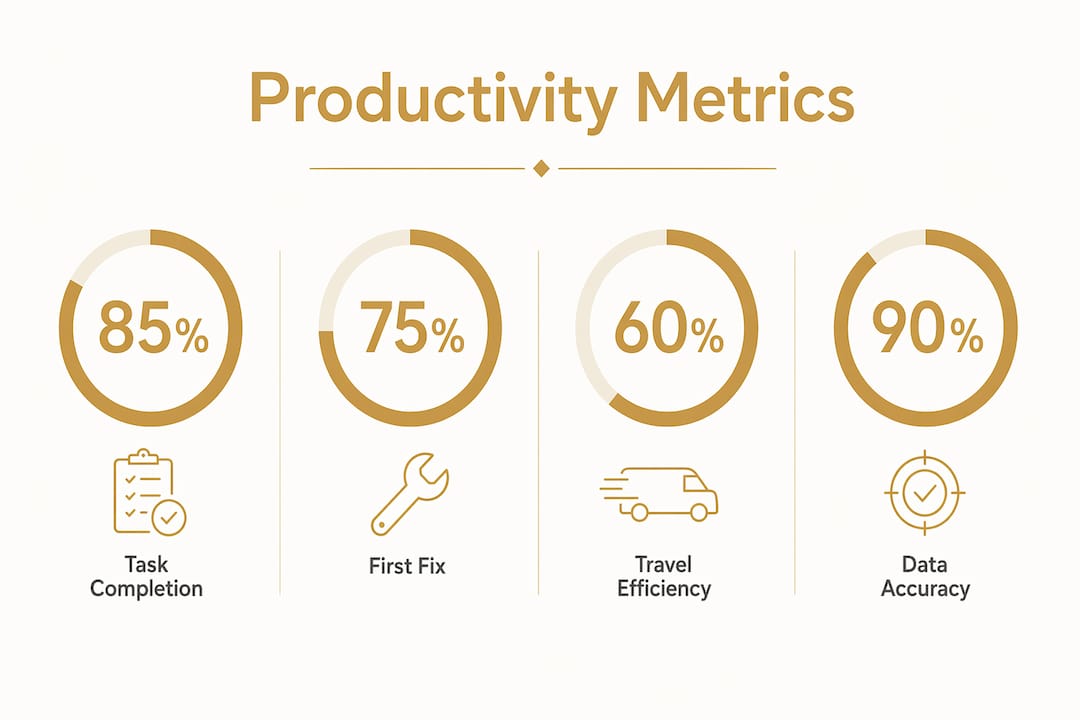
Metrics are only as reliable as the data feeding them. A completion rate calculated from manually entered timestamps is far less trustworthy than one pulled from GPS-verified, auto-logged field records. The tools you choose determine whether your metrics reflect reality or just what workers remembered to type.
What types of field workforce productivity tools actually exist?
Five categories cover the full range of what field managers need. Most operations benefit from at least three of them working together.
Work order and task management software sits at the center of field operations. These platforms assign jobs, attach checklists, track status in real time, and store completion records. The best ones push tasks to mobile devices and update automatically when a worker marks a job done, without requiring a phone call back to the office.
Real-time GPS tracking and geofencing solves the visibility problem. Managers see where every worker is on a live map, and geofencing automates the administrative work around it. When a technician enters a job site, the system clocks them in, updates the job status, and notifies the customer. Geofencing enables a 90% reduction in manual time tracking errors by replacing manual clock-ins with location-triggered automation.
Scheduling and route optimization tools address one of the largest hidden costs in field service: travel time. Algorithm-based routing sequences daily stops to minimize drive time, and dynamic rescheduling adjusts automatically when a job is added or canceled mid-day. Organizations using route optimization have reported up to a 23% reduction in daily travel time and 18% savings in fuel costs.
Communication and collaboration apps keep field workers connected to the office and to each other without requiring constant phone calls. Push notifications, group messaging, and document sharing all reduce the lag between a field condition changing and a supervisor knowing about it.
Analytics and reporting platforms close the loop. Raw GPS pings and job logs become meaningful only when aggregated into dashboards that show completion trends, SLA performance, and team-level comparisons. Integrated field apps that combine task management, location tracking, communication, and reporting in one platform reduce the data silos that make reporting slow and unreliable.
Adoption challenges are real across all five categories. Tools that require workers to type long entries while wearing gloves, or that lose data when connectivity drops, get abandoned fast. Mobile-first design and offline capability are not optional features; they determine whether a tool actually gets used in the field.
Top 10 field worker productivity tools for 2026
The tools below cover the full range of field operations needs, from trades-specific platforms to general project management apps that field teams have adapted for their workflows.
1. Fieldman
Fieldman is built specifically for utility and infrastructure field teams. It focuses on measuring field worker productivity through job completion tracking, work order management, and KPI dashboards designed around utility operations. For managers who need to report on compliance and inspection rates, Fieldman’s structured approach to data collection makes it a natural fit.
2. Arrivy
Arrivy centers on customer-facing field service, combining scheduling, real-time technician tracking, and automated customer notifications. Its strength is the customer experience layer: clients receive live updates on technician arrival times, which reduces inbound calls and improves satisfaction scores. Field managers get a clear view of daily job flow and SLA performance.
3. EngagedlyFX
EngagedlyFX applies performance management principles to field workforces, connecting individual KPIs to broader organizational goals. It is particularly useful for managers who need to run structured performance reviews alongside day-to-day field tracking, rather than treating productivity data and HR processes as separate systems.
4. Asana
Asana handles task and project management for field teams that operate across multiple concurrent projects. Its timeline views and dependency tracking work well for construction and inspection crews managing phased work. The mobile app is solid, though Asana is better suited to supervisors coordinating work than to technicians logging jobs in the field.
5. Trello
Trello’s card-based boards give field teams a visual way to track job status from “assigned” through “in progress” to “complete.” It works best for smaller teams or operations where jobs move through a predictable set of stages. The simplicity that makes Trello easy to adopt also limits it when workflows get complex or when you need GPS-level field data.
6. Slack
Slack replaces the phone-tag and email chains that slow field operations down. Field supervisors can create channels by crew, job site, or trade, and workers can send photos, voice messages, and status updates directly from the job. Integrated with other tools via Zapier or native APIs, Slack becomes a real-time communication layer across the entire field operation.
7. Zapier
Zapier connects apps that do not natively talk to each other. For field operations, that often means automatically moving a completed job record from a task management tool into a payroll system, or triggering a Slack notification when a GPS check-in is logged. It eliminates the manual data re-entry that costs field teams hours every week and introduces transcription errors into records.
8. Microsoft Teams
Microsoft Teams works well for field organizations already running Microsoft 365. Beyond messaging, it supports video calls for remote inspections, document sharing for safety procedures, and integration with SharePoint for centralized record keeping. For enterprise field operations with large back-office teams, Teams reduces the communication gap between the field and the office.
9. Monday.com
Monday.com offers more customization than Trello with more approachability than enterprise project management platforms. Field managers can build dashboards that track job completion rates, crew assignments, and project milestones in one view. Its automation features handle routine notifications and status updates without requiring a developer to set them up.
10. Hubstaff
Hubstaff combines GPS tracking, time logging, and productivity reporting in a single platform aimed at distributed field teams. It tracks hours against specific jobs and locations, which makes payroll verification and client billing more accurate. The GPS data also feeds directly into productivity reports, so managers can see travel time versus work time without manual calculation.
11. Workday
Workday operates at the enterprise level, connecting field workforce data to HR, payroll, and financial systems. For large organizations managing hundreds of field workers across multiple states, Workday’s ability to unify scheduling, compliance tracking, and labor cost reporting in one system reduces the reconciliation work that otherwise falls on operations managers.
12. Notion
Notion functions as a flexible knowledge base and project tracker that field teams use to document procedures, track ongoing jobs, and share reference materials. It is not a GPS or time-tracking tool, but for teams that need a single place to store SOPs, inspection checklists, and project notes, Notion fills that gap without requiring a specialized platform.
Expert insights and real-world results from field productivity tools
The practitioners who get the most out of these tools share one consistent approach: they measure outcomes, not activity. Tracking whether a job was completed and whether it met compliance standards tells you far more than monitoring how many minutes a worker spent in a particular app.
Productivity tools focused on job completion and compliance consistently outperform simple monitoring of screen or app activity. When workers understand that the system measures results rather than surveillance, adoption rates improve and morale holds steady. Framing tools as safety and coordination aids rather than tracking devices is the single most effective change management move a field supervisor can make.
Debecorp’s CHERP platform was built directly from tradesmen’s input, which shows in how it handles the friction points that kill adoption elsewhere. Time and attendance logging happens through GPS-verified check-ins rather than manual entry, which matters enormously for workers in gloves or on scaffolding. Daily logs and safety compliance records are captured at the point of work, not reconstructed at the end of a shift.
SiteComm addresses the communication gap that causes delays on jobsites. When a crew lead needs to flag a safety issue or request a material change, SiteComm routes that information to the right people without the phone tag. That kind of real-time jobsite communication directly reduces the rework and wait time that drag down completion rates.
Field process management software has reduced data management hours by 30% and doubled inspection completion rates in documented cases. Digital inspection reporting produces up to an 80% decrease in inspection time compared to paper-based processes.
Offline-first architecture separates tools that work in the field from tools that only work in a conference room. When a crew loses cell signal in a basement or a remote site, the platform needs to keep capturing data locally and sync automatically when connectivity returns. Tools that fail at this point create data gaps that undermine every metric you are trying to track.
Training works best when it uses real workflows on real devices. Abstract demos in a conference room do not prepare workers for the conditions they will face. Internal champions, short video walkthroughs, and one-page quick-reference guides keep workers productive during the transition without requiring them to wait on IT support.
The change management side of digital tool adoption gets underestimated consistently. Deploying software without addressing how it changes daily routines leads to parallel systems, where workers use the new tool for compliance and the old paper system for actual work. Simplifying workflows before rollout, not after, prevents that split.
How do you choose the right productivity tools for your field operation?
The right tool depends on what your operation actually needs, not on feature lists. Start with three questions before evaluating any platform.
What data are you currently missing? If you cannot answer basic questions like how long jobs take on average or what percentage of inspections pass on the first attempt, you need better data capture before you need better analytics. Prioritize platforms with strong mobile forms, GPS auto-logging, and offline capability.
How technically comfortable is your field workforce? A platform that requires ten taps to log a job completion will get abandoned by workers in physically demanding conditions. Mobile-first interfaces with GPS auto-check-ins and voice input reduce friction for workers who cannot easily type on a screen mid-task.
What systems does it need to connect to? A field tool that does not talk to your payroll, CRM, or compliance reporting system creates a new data silo instead of eliminating one. Check for API integrations with the back-office systems you already run before committing to a platform.
Beyond those three questions, weigh these criteria:
- Offline capability: non-negotiable for any team working in low-connectivity environments
- Compliance and audit trails: regulated industries need timestamped, GPS-verified records that hold up to scrutiny
- Customizable workflows: your inspection checklist is not the same as anyone else’s; the platform needs to reflect how your team actually works
- Scalability: a tool that works for 10 workers should still work when you have 100, without requiring a complete rebuild
- Adoption support: vendor onboarding quality varies widely; ask specifically about field-condition training and what happens when workers get stuck
A construction door checklist, for example, requires specific sequential steps tied to safety codes. A construction compliance checklist built into a field platform ensures those steps are completed in order, documented automatically, and available for audit without anyone manually compiling records afterward.
Organizations with real-time field visibility achieve 20–30% higher workforce productivity compared to those relying on manual reporting. That gap comes from faster dispatch, fewer missed appointments, and the elimination of the administrative back-and-forth that consumes hours every week. The tools that close that gap are the ones worth investing in.
Key Takeaways
The most effective field workforce productivity strategy combines outcome-focused metrics, mobile-first tools with offline capability, and a change management approach that frames technology as a coordination aid rather than surveillance.
| Point | Details |
|---|---|
| Outcome metrics outperform activity tracking | Measure task completion rate, first-time fix rate, and SLA adherence rather than app usage or screen time. |
| Travel-to-service ratio is the top routing KPI | Comparing travel time to work time directly reveals route inefficiency and scheduling problems. |
| Geofencing cuts time tracking errors | Location-triggered automation enables a 90% reduction in manual time tracking errors, per field management research. |
| Offline capability determines real-world adoption | Tools that lose data when connectivity drops get abandoned; automatic sync after reconnection is a baseline requirement. |
| Change management drives tool success | Software deployment without workflow simplification creates parallel systems and undermines the metrics you are trying to track. |
Debecorp’s CHERP and SiteComm are built for this

Debecorp built CHERP and SiteComm from the ground up with input from tradespeople who live these challenges daily. CHERP handles time and attendance, daily logs, and safety compliance, all configured for specific trades rather than generic office workflows. SiteComm keeps crews connected and informed without the phone tag that slows jobsites down.
If you manage field workers in the trades and need tools that actually fit how the work gets done, explore CHERP and SiteComm to see what purpose-built field software looks like in practice.