
Structured, real-time communication tools reduce rework on construction projects by creating a single source of truth that prevents crews from building from wrong or outdated information. The core mechanisms:
- Version control pushes the current drawing to every device and archives superseded sheets automatically
- Structured RFI workflows route questions to the right person and timestamp every response
- Photo capture with markup documents existing conditions and flags discrepancies before work begins
- Role-based push notifications confirm that critical updates reached the crew who needed them
- Searchable audit trails make every decision recoverable, so disputes resolve in minutes instead of days
Industry reporting puts miscommunication-driven rework at roughly $31.3 billion annually in the U.S. That figure is not an abstraction. It shows up on your job as idle crew hours, torn-out work, and margin that disappears before closeout.
Key Takeaways
Communication tools reduce rework because they replace informal, untracked decisions with structured, auditable records that reach the right crew at the right time.
| Point | Details |
|---|---|
| Rework starts with communication failure | Most rework traces back to a personal text, buried email, or outdated drawing that never reached the field. |
| Six core mechanisms matter | Version control, RFI workflows, photo markup, push notifications, audit trails, and single source of truth each interrupt a specific failure mode. |
| Measure six KPIs from day one | Track RFI response time, rework event count, rework cost as % of budget, outdated-drawing incidents, idle crew hours, and RFI processing cost. |
| Tools require governance to work | Naming rules, acknowledgment requirements, and a 30-minute scenario-based training session determine whether adoption sticks. |
| Debecorp’s CHERP and SiteComm | CHERP logs crew acknowledgments and daily records; SiteComm delivers real-time notifications and photo documentation to close the rework gap. |
Table of Contents
- How does rework actually start on a construction project?
- Why communication tools reduce rework: the specific mechanisms
- Which tool features should you prioritize for the field?
- What KPIs should you track, and what savings can you expect?
- How to implement tools so they actually change behavior
- When do communication tools fall short?
- How CHERP and SiteComm address the rework chain
- What actually changes when you commit to these tools
- CHERP and SiteComm are built for exactly this problem
- Sources
How does rework actually start on a construction project?
Most rework does not begin with a bad decision. It begins with a good decision that never reached the right person.
The common failure modes follow a predictable pattern:
- Outdated drawings in the field. A revised sheet is issued, but the foreman’s printed set is three revisions old. The crew builds to the old dimension.
- Missed or buried RFIs. A question goes into an email thread. The GC’s PM responds, but the response never makes it back to the sub’s foreman.
- Unclear scope at handoffs. One trade finishes rough-in and leaves. The next trade assumes something was done. It wasn’t.
- Decisions made in personal channels. A superintendent texts a change to a foreman’s personal phone. That text is invisible to the project record.
- Siloed communication. The architect, GC, and three subs each have separate email threads on the same issue. Four different answers circulate simultaneously.
The timeline of a typical rework event runs like this: a decision is made informally, it reaches the crew 24–72 hours late or in corrupted form, the crew builds to the wrong information, and the error is discovered at inspection or by the next trade. By then, the cost to fix it is three to five times what a correction at the decision point would have cost.
Pro Tip: Audit your last three rework events and trace each one back to its communication origin. In most cases you will find the failure in one of two places: a personal text or email that never entered the project record, or a drawing that was revised without a formal notification to the field.
Firms that standardize project communication in auditable systems keep rework below roughly 5% of project budget. Firms that don’t typically run two to three times that rate.
Why communication tools reduce rework: the specific mechanisms
The benefits of communication tools are not vague. Each mechanism interrupts a specific failure mode.
-
Single source of truth. One centralized document environment means every user pulls the same current file. Cloud-based document control eliminates the scenario where two crews work from different drawing revisions simultaneously.
-
Enforceable RFI workflows. A structured RFI system routes the question, sets a due date, and notifies the assignee. The response is logged against the question. No response can be “lost” in an inbox.
-
Timestamped photo capture with markup. A field photo tagged with GPS coordinates, a timestamp, and a markup annotation creates an unambiguous record of existing conditions. That record stops disputes before they become rework orders.
-
Automated version control. When a drawing is revised, the old version is archived and the new one is pushed automatically. Crews cannot accidentally open a superseded sheet.
-
Role-based push notifications with acknowledgment. A critical update is not just sent. The system confirms who opened it and when. Unacknowledged alerts escalate.
-
Searchable audit trails. Every decision, photo, RFI response, and drawing revision is indexed and searchable. When a dispute arises, the answer is a search query away, not a two-day email archaeology project.
A 2025 workplace-efficiency study found a very strong correlation (r = .835) between use of digital communication platforms and improved work quality. That correlation holds across industries, and the construction context gives it a direct cost interpretation: better work quality means fewer tear-outs.
Stat: A correlation of r = .835 between digital platform use and work quality is among the strongest reported in organizational productivity research. For a PM, that translates to a measurable, trackable signal, not a soft benefit.
Which tool features should you prioritize for the field?
Not every feature in a platform’s marketing deck matters equally for rework reduction. These categories earn their place:
- Mobile-enabled document management with versioning. Field crews need current drawings on a phone or tablet, not a print set from last Tuesday. Document sharing built for construction teams means versioning happens automatically, not manually.
- Structured RFI and workflow tools. Freeform email is where RFIs go to die. A structured workflow assigns, tracks, and closes each item with a timestamp.
- Photo capture with metadata. GPS, timestamp, and markup baked into the photo. Not a camera roll. A documented record.
- Checklists and safety forms. Digital checklists tied to a task or location prevent the “I thought someone else checked that” failure.
- Push notifications with read receipts. Sending an update is not communicating. Confirming receipt is.
- Offline-first mobile performance. A tool that requires full LTE to function is useless in a basement or a rural site. Offline sync is a field requirement, not a nice-to-have.
- BIM and ERP integration. When the model and the field record talk to each other, coordination conflicts surface in the design phase, not during installation.
For field constraints, the rule is simple: if a foreman cannot complete the core workflow in three taps, the tool will not get used. Jobsite communication tools designed with tradespeople, not office staff, in mind have a measurably higher adoption rate.
What KPIs should you track, and what savings can you expect?
Measure these six metrics before and after implementation:
| KPI | What it measures |
|---|---|
| RFI response time (days) | Speed of information flow from field to decision-maker |
| Rework events per month | Frequency of incorrect work requiring correction |
| Rework cost as % of budget | Financial weight of rework on the project |
| Outdated-drawing incidents | How often crews work from superseded documents |
| Idle crew hours awaiting clarification | Labor cost of communication delays |
| RFI processing cost per item | Administrative overhead per question resolved |
Sample calculation. On a $10M commercial project, cutting RFI turnaround from 10 days to 2 days eliminates roughly 8 days of potential crew idle time per RFI cycle. If a crew of six waits at $85/hour fully loaded, one delayed RFI costs $4,080 in idle labor alone. Reduce that across 40 RFIs in a project and the math becomes significant before you count a single rework event.
Industry commentary reports that consolidating communications and workflows can yield up to a 30% reduction in delays and a 20% drop in rework on projects where the change is implemented consistently. These are directional figures from industry reporting, not guaranteed outcomes, but they align with the r = .835 correlation between platform use and work quality.
Measurement plan: Establish a baseline in month one. Run a 90-day checkpoint comparing RFI response time and rework event count. Conduct a full evaluation at six months with cost data.
How to implement tools so they actually change behavior
Software installed but ignored is worse than no software. It creates a false sense of coverage while the real decisions keep flowing through texts and emails.
- Assign an executive sponsor and define target KPIs before selecting a tool. Without a named owner and a measurable goal, adoption stalls at the pilot.
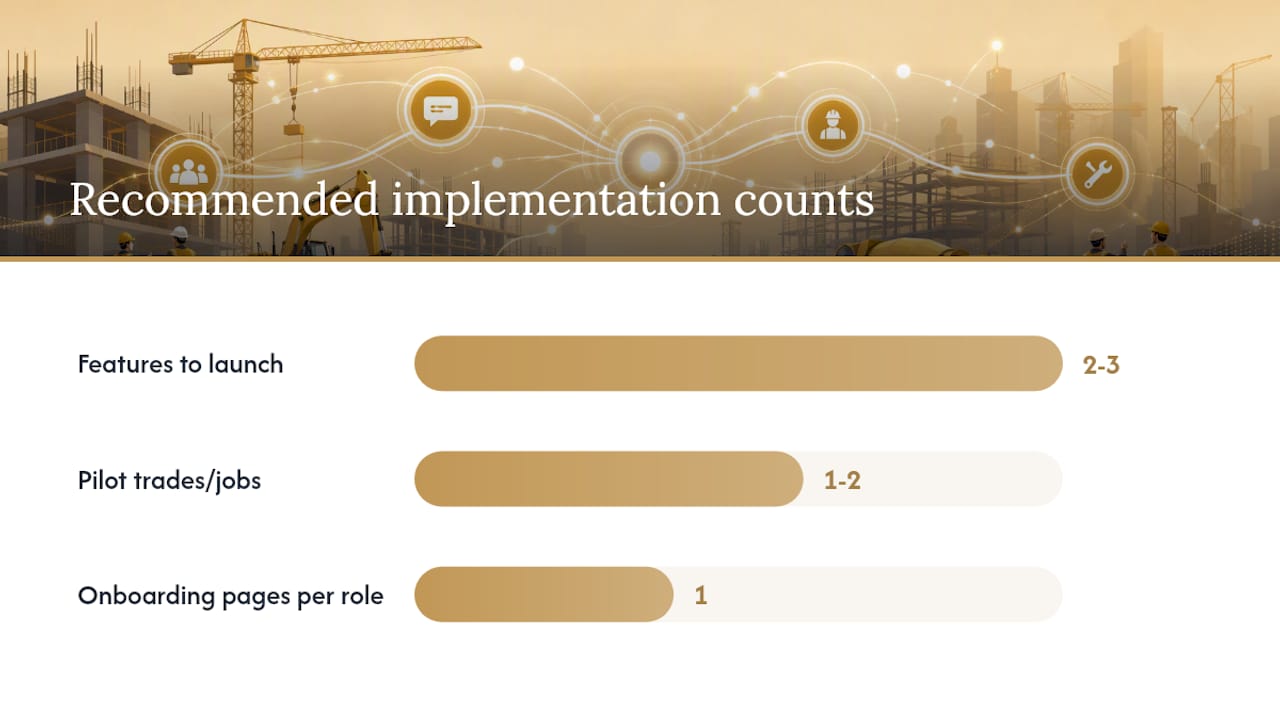
- Choose a minimal feature set for launch. Pick the two or three features that address your highest-frequency failure modes. Add more after adoption is stable.
- Pilot on one or two trades or jobs. A focused pilot generates real data and real advocates. A company-wide rollout on day one generates resistance.
- Define naming, versioning, and RFI rules in writing. “Drawing Rev 3 supersedes Rev 2” needs to be a rule, not an assumption. Document it before the first file is uploaded.
- Run field onboarding with quick-reference cards. One page per role. Laminated. Posted in the job trailer.
- Integrate with your document and BIM systems. A tool that lives in isolation creates a new silo. Centralizing construction team updates means one environment, not three.
- Build a short feedback loop. Weekly for the first month, monthly after that. Gathering worker feedback surfaces friction before it becomes abandonment.
Research on digital tool adoption confirms that ease of use and management support are the two strongest predictors of whether a platform actually improves project performance. Both are within your control.
Pro Tip: Design your 30-minute field training around one scenario the crew will face in the next two weeks, not a feature tour. Have them complete an actual RFI, acknowledge an actual drawing update, and take a marked-up photo. Muscle memory from a real task transfers. A slide deck does not.
When do communication tools fall short?
Digital tools reduce rework reliably in routine, technical, and coordination-heavy situations. They are less effective in a few specific contexts.
- Trust-sensitive negotiations. A subcontractor dispute over scope requires a face-to-face conversation. A push notification will not resolve it. Research confirms that digital communication performs poorly for emotionally charged or politically sensitive exchanges.
- Very low-infrastructure sites. No connectivity, no platform. Offline-first design helps, but it does not eliminate the constraint entirely.
- Poorly trained users. A tool used incorrectly creates a false record. A foreman who acknowledges a drawing update without reading it has not reduced rework risk.
- Information overload. Too many notifications train crews to ignore all of them. Notification discipline is a governance problem, not a technology problem.
- Mistaking the tool for the process. Software does not replace pre-construction planning, quality control checkpoints, or on-site coordination meetings. It supports them.
The practical complement to any digital tool rollout is a set of face-to-face coordination touchpoints: a weekly foreman meeting, a pre-task plan review before high-risk scopes, and a quality control checkpoint at each phase transition.
How CHERP and SiteComm address the rework chain
Consider a common jobsite scenario: a mechanical sub receives a revised duct routing drawing at 7 AM. Under a legacy workflow, that revision might sit in the GC’s email until mid-morning, reach the foreman by text at noon, and never formally reach the sheet metal crew. By 2 PM, two hours of installation are in the wrong location.

With SiteComm, the revised drawing triggers a push notification to every affected trade at 7 AM. The foreman acknowledges receipt in the platform. A photo markup of the revised routing is attached to the notification so the crew sees the change in context, not just a file name.
With CHERP, the daily log for that crew captures the acknowledgment, the time of the update, and the foreman’s sign-off. If a dispute arises at inspection, the audit trail is two taps away.
Feature mapping to the mechanisms covered earlier:
- SiteComm jobsite chat and push notifications address role-based notification with acknowledgment
- SiteComm photo capture addresses timestamped photo documentation with markup
- CHERP daily logs address the searchable audit trail and crew acknowledgment record
- CHERP work management and safety compliance tools address checklist and safety form workflows
What actually changes when you commit to these tools
The conventional wisdom says adoption is a technology problem. It isn’t. The technology is the easy part.
What actually changes on a jobsite when these tools work is the default behavior of foremen. Instead of texting a question to a superintendent’s personal phone, they log an RFI. Instead of printing a drawing and hoping it’s current, they pull the live document. That behavioral shift is what cuts rework, not the software itself.
The resistance is real and predictable. Foremen who have run crews for 20 years have a system that works for them, even if it leaks information at the edges. The way to move them is not a mandate. It is a demonstration: show one foreman one situation where the tool saved him a callback, and he becomes your best advocate on the site.
The payoff in fewer punch-list items and rework events is measurable within 90 days on a well-run pilot. The harder gain is the one that shows up at project closeout: a complete, auditable record that protects your firm when a dispute arises.
CHERP and SiteComm are built for exactly this problem
Debecorp built CHERP and SiteComm from the ground up with input from tradespeople who live these failure modes every day. CHERP handles field operations: daily logs, crew acknowledgments, safety compliance, and work management, all tied to specific trades. SiteComm handles the communication layer: jobsite chat, push notifications, and photo documentation with the metadata that makes records defensible.

If you want to measure your current rework baseline and see where the communication gaps are costing you, the CHERP and SiteComm platforms are designed to make that visible within a short pilot. Start with one trade, one job, and the two or three failure modes that cost you the most last quarter. The data will tell you the rest.
Sources
- Advantages and drawbacks of digital communication in remote and hybrid work settings. A sectoral case study in professional services
- Enhancing Office Productivity: A Study on the Role of Digital Communication Tools in Boosting Workplace Efficiency
- Digital communication tools and project performance during the pandemic (PMC)
- Why Email Hurts Construction Projects | BUILT
- Reducing Costs by Reducing Rework | InEight Blog