
For most skilled trades teams, CHERP and SiteComm by Debecorp are the strongest Infieldr.io alternatives available in the U.S. right now. They’re built specifically for the trades, not adapted from a generic job-management template, and they cover the core workflows Infieldr.io targets: time and attendance, daily logs, jobsite communication, and safety compliance.
If your crew works in construction, electrical, plumbing, HVAC, or any other skilled trade, a platform designed around your actual workflows will outperform a mobile-first generalist app every time. Infieldr.io describes itself as an AI-powered mobile field service app with offline capability, job management, invoicing, and an AI assistant named AIRA. Those are solid features. But “AI-enabled” means very different things across platforms, and the gap between a genuine trades-first tool and a polished mobile app becomes obvious the moment a foreman tries to log a daily report from a basement with no signal.
The shortlist below covers 17 platforms across multiple categories: trades-first field operations (CHERP, SiteComm), enterprise dispatch suites (ServiceTitan, BuildOps), SMB scheduling apps (Jobber, Housecall Pro, Kickserv, FieldPulse), AI-native estimators (QuoteIQ, Handoff, Projul), and lighter-weight or niche tools (Zuper, KonstructIQ, Dave, Tallie, Field Promax, FieldFuze). The comparison table is the fastest way to shortlist. Vendor profiles and a pilot playbook follow.
Quick shortlist:
- CHERP (Debecorp): Best for trades organizations needing time & attendance, daily logs, and compliance
- SiteComm (Debecorp): Best for jobsite communication, crew engagement, and rapid adoption
- ServiceTitan: Best for larger residential and commercial service businesses
- Jobber: Best for small-to-mid service businesses wanting a clean, fast setup
- BuildOps: Best for commercial specialty contractors needing enterprise dispatch
- FieldPulse: Best for growing service companies wanting an all-in-one at a lower price point
Key Takeaways
For most skilled trades teams in the U.S., CHERP and SiteComm by Debecorp are the strongest alternatives to Infieldr.io because they’re built around how trades actually work, not adapted from a generic service dispatch template.
| Point | Details |
|---|---|
| Trades-first design wins on adoption | Per-trade calculators, crew hierarchy, and role-based admin drive crew adoption that generic platforms can’t match. |
| Test offline before you commit | Ask every vendor to demonstrate true offline sync in a live demo; cached views are not the same as queue-and-sync. |
| AI claims need an audit trail | Useful AI shows its reasoning and lets you edit the output; a black box AI in a compliance environment is a risk. |
| Pilot scope matters | Run a 4-week pilot with one crew, defined KPIs, and a real payroll cycle before signing any contract. |
| CHERP and SiteComm by Debecorp | The recommended trades-first alternative: covers time & attendance, daily logs, safety compliance, and jobsite communication in one deployment. |
Table of Contents
- What are the best Infieldr.io alternatives for field service managers?
- Vendor profiles: CHERP, SiteComm, and the alternative categories
- How do you choose the right alternative and run a pilot?
- Determining which AI and field features matter most in 2026 depends on platform capabilities and user needs.
- Why a trades-first platform improves adoption and outcomes
- A field service manager’s honest take on this decision
- CHERP and SiteComm are worth a serious look as your Infieldr.io replacement
- Sources
What are the best Infieldr.io alternatives for field service managers?
How these platforms were selected
Every platform on this list was evaluated against the core feature set Infieldr.io claims: offline mobile capability, job management, scheduling, invoicing, and AI-assisted workflows. Selection criteria also included U.S. availability, verified user feedback on Capterra, and real-world testing evidence from Inc. Magazine’s hands-on roundup of field service tools. Platforms that serve distinct buyer categories (enterprise, SMB, trades-first, estimating-only) were included to give field service managers a complete picture rather than a narrow vendor scorecard.
Pricing models in field service software follow a few common patterns: per-user monthly subscriptions, per-job or per-technician fees, and tiered feature bundles. Entry-level SMB tools typically run in the $30–$100 per user per month range. Enterprise platforms like ServiceTitan and BuildOps are priced on custom contracts, often significantly higher. Trades-first platforms like CHERP and SiteComm use a subscription model sized for crews, not individual seats, which changes the total cost calculation for larger teams.
Vendor profiles: CHERP, SiteComm, and the alternative categories
CHERP (Debecorp)
CHERP is a field operations platform built specifically for the skilled trades, covering time and attendance with GPS, daily logs, safety compliance, crew hierarchy, and per-trade field calculators. The development process was informed directly by tradesmen, which shows in the UX: a foreman can clock in a crew, file a daily log, and flag a safety issue without navigating menus designed for a generic service dispatcher.
Standout features: Per-trade calculators, role-based admin, customizable trade profiles, privacy-focused deployment, Android and web access with offline capability.
Best for: Electrical, plumbing, HVAC, carpentry, and other skilled trades organizations that need compliance-grade daily logs and accurate time tracking across multiple crews.
One downside: CHERP’s strength is field operations depth, not broad CRM or marketing automation. If your primary need is customer-facing features like online booking or review management, pair it with a dedicated CRM.
SiteComm (Debecorp)
Where CHERP handles the operational layer, SiteComm handles the human layer. Jobsite chat, worker-owned social features, peer recognition, and crisis support modules address something most field service platforms ignore entirely: the fact that crews communicate constantly, and that communication either happens in your platform or in a group text thread you can’t see or search.
Standout features: Jobsite chat, safety and crisis support, peer recognition, worker-owned social features.
Best for: Companies where crew engagement and communication quality directly affect safety outcomes and retention.
One downside: SiteComm is a communication and community layer, not a standalone operations platform. It works best deployed alongside CHERP.
Pro Tip: Deploy SiteComm alongside CHERP from day one. Teams that adopt both together show faster onboarding because the communication layer makes the operational features feel less like software and more like a crew tool.
Enterprise dispatch suites: ServiceTitan and BuildOps
ServiceTitan is the market leader for large residential and commercial service businesses. It covers scheduling, dispatch, invoicing, payroll, and marketing automation in one platform, and its AI features include demand forecasting and scheduling optimization. The tradeoff is cost and complexity: implementation typically takes months, and the pricing reflects an enterprise contract, not a per-seat subscription. Real-world testing shows material differences in how platforms like ServiceTitan handle scheduling and invoicing workflows compared to lighter tools.
BuildOps targets commercial specialty contractors specifically, with strong dispatch, service agreements, and reporting. It integrates with QuickBooks and Procore, which matters for GCs managing subcontractors.
Neither platform is trades-first in the way CHERP is. They’re built for service dispatch operations, not for the compliance and crew-hierarchy needs of a construction or specialty trade crew.
SMB scheduling apps: Jobber, Housecall Pro, Kickserv, FieldPulse
These four platforms share a common profile: clean mobile UX, fast setup, and solid QuickBooks integration. Jobber is the most polished for client-facing workflows (quoting, client portal, automated follow-ups). Housecall Pro leans into home services with strong payment processing and review automation. Kickserv is the budget option, with a free tier that works for solo operators. FieldPulse sits between Jobber and the enterprise tier, with GPS tracking and workflow automation at a price point that growing teams can absorb.
The gap with all four: none of them have trade-specific modules. A plumber using Jobber gets the same scheduling interface as a cleaning company. That’s fine for simple job dispatch. It’s a real limitation when you need per-trade compliance logs or crew hierarchy for a 20-person electrical crew.
AI-native estimators: QuoteIQ, Handoff, Projul
QuoteIQ focuses almost entirely on fast estimate generation, with AI that helps contractors build quotes from templates. Handoff targets residential remodelers with AI-assisted project handoff documents and client communication. Projul adds scheduling and budgeting to a construction-focused workflow.
These tools solve a specific problem well. They’re not full field operations platforms, and none of them replace the time and attendance or daily log functions that trades organizations need for payroll accuracy and OSHA compliance.
Niche and lighter-weight tools: Zuper, KonstructIQ, Dave, Tallie, Field Promax, FieldFuze
Zuper offers flexible workflow configuration and strong enterprise integrations (Salesforce, Zendesk), making it a reasonable choice for field service teams that live inside a Salesforce ecosystem. KonstructIQ covers construction project tracking with RFIs and submittals. Field Promax and Dave serve small field service businesses that need basic work order and invoicing functionality without enterprise complexity. Tallie is an expense management tool, not a field operations platform. FieldFuze’s strength is asset tracking and preventive maintenance, which suits facilities management more than skilled trades.
As Spotio’s field software comparison notes, different platform categories serve genuinely distinct use cases. Mapping your actual operational needs to a platform category before evaluating vendors saves weeks of demo time.
How do you choose the right alternative and run a pilot?
Buyer criteria checklist
Before you book a demo, answer these questions about your own operation:
- Company size and crew structure: Do you have one crew or twenty? Platforms priced per user get expensive fast at scale.
- Trade-specific needs: Do you need per-trade compliance logs, crew hierarchy, or OSHA-aligned daily reports? Generic platforms won’t have these.
- AI value vs. AI hype: Can the vendor show you a specific AI output (a generated estimate, a flagged scheduling conflict) in a live demo? If they can only describe the AI, treat it as unproven.
- Offline mobile behavior: What happens when a tech loses signal mid-job? Ask for a live demonstration, not a slide.
- Reporting and payroll readiness: Can the platform export time and attendance data directly to your payroll system, or does it require manual reconciliation?
- Integrations: QuickBooks and Xero are the baseline. If you use Procore or a specific CRM, confirm the integration before signing.
Questions to ask during vendor demos
- How long does implementation take for a crew our size?
- What does data migration look like, and who owns it?
- Do you offer API access, and is it gated behind a higher tier?
- Can we set conditional automations (e.g., flag a daily log as incomplete after 6 PM)?
- What is your SLA for support response, and is phone support included?
30–60 day pilot timeline
- Week 0–1: Define scope and KPIs. Pick two or three crews, two or three job types, and three measurable outcomes (timesheet accuracy, daily log completion rate, time-to-invoice). Read the mobile attendance tracking guide before setting your baseline.
- Week 2–3: Run core workflows. Clock in/out, file daily logs, submit work orders, and test offline sync by deliberately cutting connectivity mid-task.
- Week 4: Evaluate adoption metrics. Did crews use the app without being reminded? Did daily logs get filed same-day? Compare actual vs. expected time-to-invoice.
- Week 5–6 (if needed): Stress-test integrations. Export time data to QuickBooks. Run a payroll cycle. Flag any reconciliation gaps before committing.
Red flags that should stop a purchase
- No genuine offline mode (data queues and syncs when reconnected, not just “works with slow connections”)
- AI features with no audit trail or editable output
- No QuickBooks or Xero integration without a custom build
- API access locked behind the most expensive tier
- Implementation timelines measured in months for a crew under 50 people
Pricing expectations
Per-user monthly subscriptions are the most common model. SMB tools typically run in a low to mid price range per user per month depending on tier. Enterprise platforms (ServiceTitan, BuildOps, Zuper) use custom contracts. Crew-based subscriptions like CHERP and SiteComm price differently: you pay for organizational access rather than individual seats, which lowers the per-head cost as your crew grows. Watch for per-job fees, which can add up faster than a flat subscription for high-volume operations.
Determining which AI and field features matter most in 2026 depends on platform capabilities and user needs.
Core feature checklist for any Infieldr.io replacement
- Scheduling and dispatch with conflict detection
- Work orders with photo and document attachment
- Time and attendance with GPS verification
- Offline-capable mobile app (true queue-and-sync, not just cached views)
- On-site estimating with template support
- Invoicing with payment processing
- Parts and inventory tracking
- Compliance-grade daily logs and safety reports
What “AI-enabled” should actually mean
The term gets applied to everything from a smart autocomplete to a full predictive scheduling engine. Useful AI in a field service platform does at least one of these things with transparency:
- Predictive scheduling: Suggests crew assignments based on skill, location, and job history, and shows you why it made the suggestion.
- Estimate assistance: Generates a draft estimate from job type and historical data, with line items you can edit before sending.
- Next-best-action prompts: Flags an incomplete daily log, a crew member who hasn’t clocked out, or a job that’s running over budget.
What it should not do: produce outputs you can’t audit, edit, or override. Independent testing consistently shows that the most useful AI features are transparent about their training data, offer an editable suggestion flow, and provide an audit trail.
Validation tests to run during a demo
- Offline sync test: Ask the vendor to disable Wi-Fi on a demo device, complete a work order, then reconnect. Confirm the data synced correctly and timestamps are accurate.
- Estimate AI test: Feed the AI a real job description from your last month. Compare the output to your actual estimate. Look for line-item logic, not just a total number.
- Data export test: Export a week of time and attendance data to a CSV. Open it in Excel and confirm the format matches what your payroll system expects.
Pro Tip: Ask the vendor to show you the AI’s “reasoning” for a scheduling suggestion or estimate line item. If they can’t, the AI is a black box. A black box AI in a compliance-sensitive environment is a liability, not a feature.
For a deeper look at what real-time field reporting should look like, the real-time jobsite updates guide covers the operational requirements in detail.
Why a trades-first platform improves adoption and outcomes
Debecorp built CHERP and SiteComm from the ground up with direct input from tradesmen. That’s not a marketing claim; it’s a design methodology that produces measurable differences in how crews actually use the software.
The practical proof points:
- Per-trade calculators mean an electrician doesn’t navigate menus built for a landscaper. The tool speaks the trade’s language.
- Crew hierarchy reflects how jobsites actually work: foremen, journeymen, and apprentices have different responsibilities and different data needs.
- Privacy-focused deployment matters for workers who are skeptical of employer-controlled apps. When workers trust the platform, adoption follows.
- Daily log completeness improves when the log form matches the trade’s actual workflow rather than a generic checklist.
For field service managers evaluating platforms, the construction workforce intelligence guide explains how trades-first data design surfaces crew insights that generic platforms miss entirely.
Debecorp’s CHERP and SiteComm are available to U.S. buyers now, with deployment on Android and web. Case studies and pilot offer details are on the product page.
A field service manager’s honest take on this decision
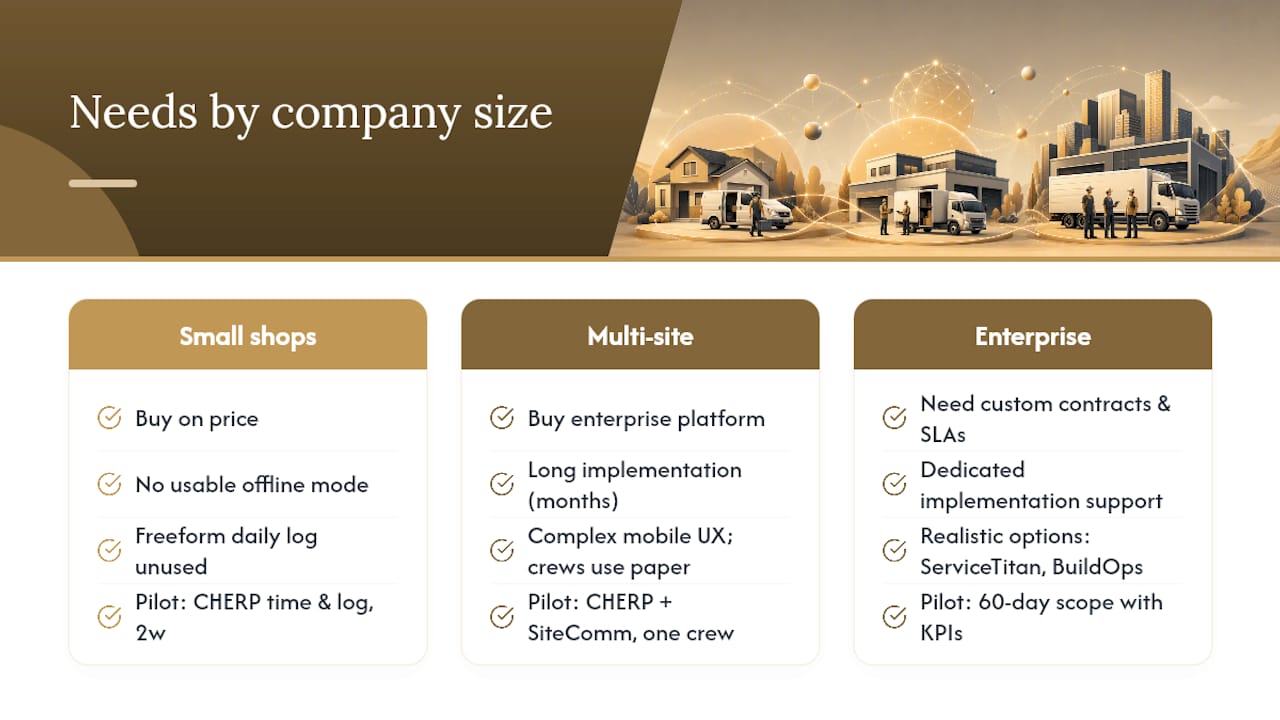
Small shops (under 10 field workers) often buy on price and regret it within six months. The cheap SMB tool that looked good in a demo turns out to have no offline mode worth using, and the daily log is a freeform text field that nobody fills out consistently. The cost of bad data compounds fast when payroll disputes and OSHA inspections arrive.
Multi-site contractors (10–100 field workers) have the opposite problem: they buy an enterprise platform because it looks serious, then spend four months on implementation and discover the mobile UX is so complex that crews abandon it for paper. The right platform for this segment is one that crews will actually use on day one, not one that impresses in a boardroom demo.
Enterprise operations (100+ field workers) need custom contracts, dedicated implementation support, and SLA guarantees. ServiceTitan and BuildOps are the realistic options at that scale. But even enterprise buyers should run a crew-level pilot before signing a multi-year contract.
The procurement mistake I see most often: buying without testing offline. Every vendor will tell you their app works offline. Almost none of them will let you test it in a demo without being asked directly. Make it a non-negotiable condition of any pilot.
For a practical pilot configuration: small shops should start with CHERP’s time and attendance and daily log modules for two weeks before adding anything else. Multi-site contractors should run CHERP and SiteComm together from day one, with one crew as the pilot group. Enterprise buyers should scope a 60-day pilot with defined KPIs before any contract discussion.
CHERP and SiteComm are worth a serious look as your Infieldr.io replacement
The alternatives covered here range from polished SMB apps to enterprise dispatch suites. Most of them do some things well. None of them are built specifically for the skilled trades the way CHERP and SiteComm are.

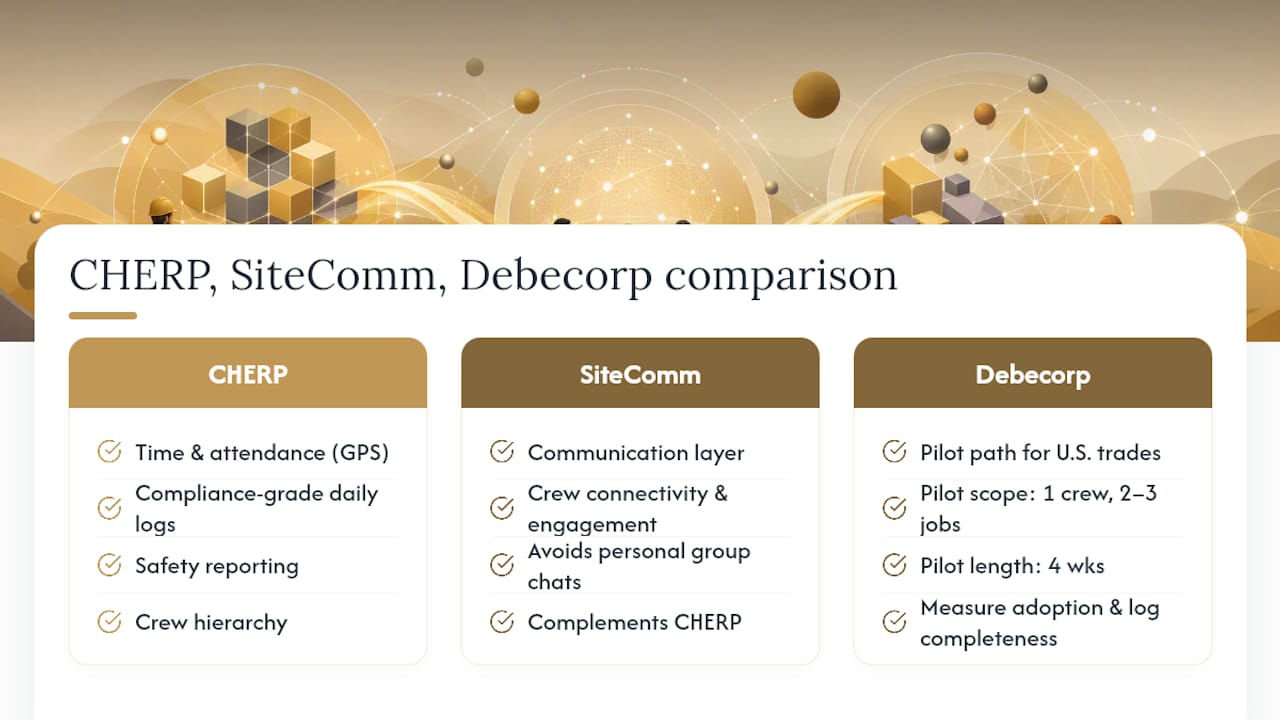
CHERP covers the operational core: time and attendance with GPS, compliance-grade daily logs, safety reporting, crew hierarchy, and per-trade calculators. SiteComm adds the communication layer that keeps crews connected and engaged without relying on personal group chats. Together, they address the full picture of what a trades team needs from a field operations platform, not just the job dispatch and invoicing functions that most alternatives prioritize.
Debecorp offers a pilot path for U.S. trades organizations. Start with a defined scope (one crew, two to three job types, four weeks), measure adoption and log completeness, and evaluate fit before committing. Migration assistance is available for teams moving from another platform.
See the full feature set and explore the CHERP and SiteComm platforms to map your trade’s specific needs to the right modules.
Sources
- We Tested the Best Field Service Software Tools - Inc. Magazine
- Best Field Sales Management Software (Compared) - SPOTIO