
Equipment tracking in the trades is defined as the use of hardware and software systems to monitor the location, condition, and usage of construction tools and equipment in real time. Construction equipment theft costs the US industry over $1 billion annually, with average contractors losing 5–10% of their tool inventory each year. That loss is not just a financial hit. It delays projects, disrupts crews, and forces last-minute procurement that inflates budgets. Understanding what equipment tracking in the trades actually involves, and how to apply it on your job site, is the first step toward stopping that drain.
What is equipment tracking in the trades?
Equipment tracking in the trades is the practice of assigning, monitoring, and managing physical assets across job sites using a combination of tagging technologies and centralized software. The industry term for this practice is construction asset management, though “equipment tracking” is the phrase most field professionals use day to day. Both terms describe the same operational function: knowing where your tools are, who has them, and what condition they are in.
The core value is visibility. Without a tracking system, tools disappear into the gap between “I thought he had it” and “it was here yesterday.” Clear ownership assignments drastically reduce the frequency of misplaced equipment. The problem is rarely negligence. It is poor visibility and unclear responsibility.
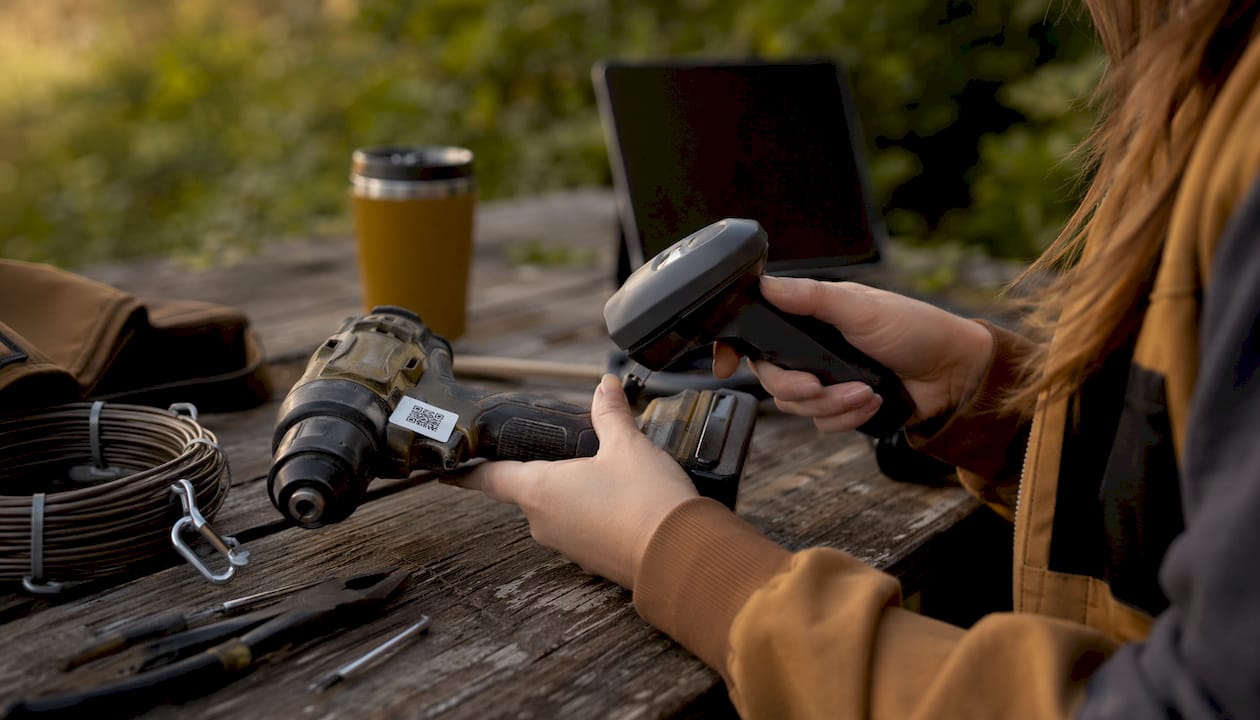
Effective equipment tracking integrates three functions: a centralized asset record, a reservation or scheduling system, and real-time checkout and return workflows. Together, these functions give site managers a live picture of every asset, from a $30 drill bit to a $200,000 excavator.
What technologies power equipment tracking systems?
The right tracking technology depends on the asset type, its value, and where it operates. No single technology fits every situation. Construction sites use a layered approach that matches the tool to the tag.
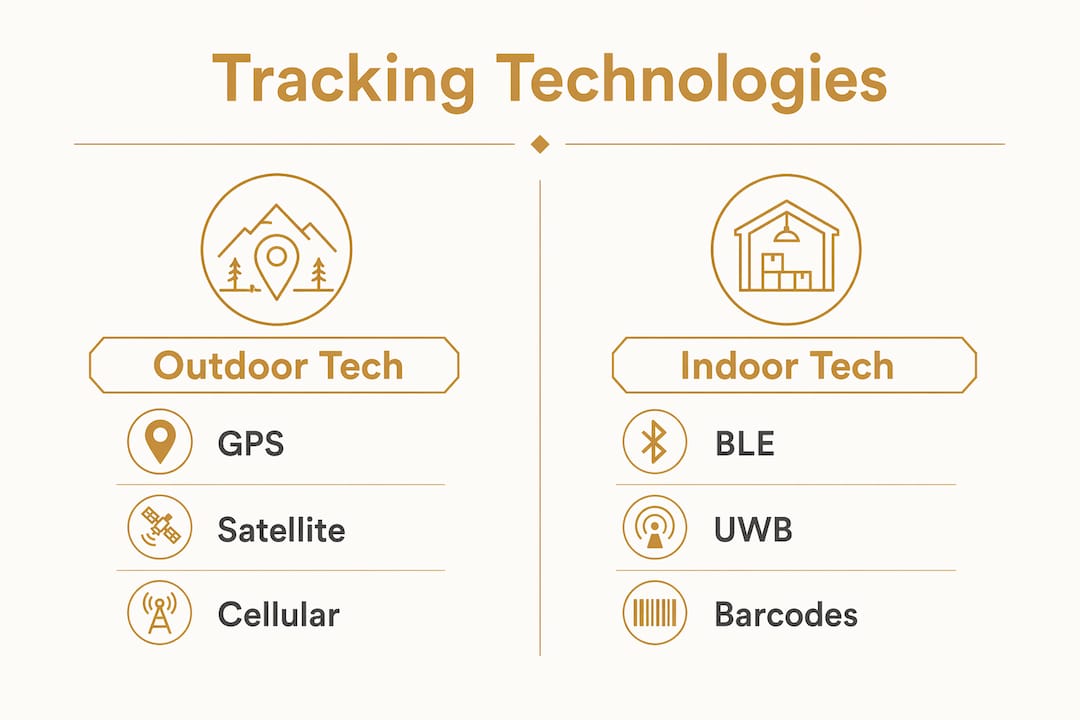
GPS trackers are the standard for high-value outdoor assets: excavators, skid steers, generators, and trailers. They provide real-time location data over cellular networks and work across multiple sites. The tradeoff is cost. GPS hardware and data plans add up quickly, which is why GPS is best reserved for assets valued over $30,000–$50,000.
QR codes and barcodes are the workhorses of small tool tracking. They cost cents per tag, require no power source, and work with any smartphone camera. A crew member scans a tag when checking out a tool and scans it again on return. The system logs the transaction automatically.
Bluetooth Low Energy (BLE) and Ultra-Wideband (UWB) sensors fill the gap for indoor environments where GPS signals fail. BLE provides room-level accuracy. UWB delivers sub-meter precision, which matters in large warehouses, multi-floor buildings, or staging areas where tools cluster in tight spaces. QR codes suit general tool checkout, GPS covers high-value outdoor assets, and BLE and UWB provide sub-meter indoor precision.
| Technology | Best use case | Accuracy | Relative cost |
|---|---|---|---|
| QR code / barcode | Small tools, hand tools | Scan-based | Very low |
| GPS | Heavy machinery, vehicles | 3–10 meters | High |
| BLE | Indoor assets, staging areas | Room-level | Medium |
| UWB | High-precision indoor tracking | Sub-meter | Medium-high |
Pro Tip: Tag every asset at the point of purchase. Retrofitting tags onto an existing inventory takes three times as long and often misses items already in circulation.
How to track equipment on construction sites effectively
Effective equipment tracking is an operational process, not just a technology purchase. The technology only works when the workflow around it is clear and consistent.
Start with a centralized asset register. Every piece of equipment gets a unique ID, a tag, and a record that includes its purchase date, assigned location, and current status. This register becomes the single source of truth for your entire inventory. Tracking software transforms static inventory into integrated operational data that includes maintenance schedules and usage patterns, not just a list of what you own.
Assign ownership explicitly. Every asset should be assigned to a specific person, vehicle, or site, not to a crew or a project in general. Vague assignment is the same as no assignment. When a tool goes missing, “the framing crew had it” is not a useful answer.
Build a checkout and return routine into daily operations. The routine does not need to be complex. A morning scan-out and an end-of-day scan-in takes under two minutes per person. That two minutes prevents hours of searching and thousands in replacement costs.
Here is a practical sequence for implementing equipment tracking workflows on a construction site:
- Build your asset register by cataloging every tool and piece of equipment with a unique ID and tag.
- Assign each asset to a responsible person or site location, not a team or project.
- Set up a mobile-friendly checkout system so crew members can log movements from their phones.
- Run a weekly audit comparing the register to physical location to catch discrepancies early.
- Log maintenance events in the same system so usage data informs service schedules.
- Review utilization reports monthly to identify underused assets before buying duplicates.
Pro Tip: Make the site foreman or procurement manager the owner of the tracking system, not the IT department. Tracking is an operational task best handled by the people closest to the assets. They have the context to catch errors immediately.
Common challenges in equipment tracking implementation
The biggest reason tracking systems fail is not bad technology. Systems fail when manual updates take too long or disrupt workflow. A system that requires five steps to log a tool checkout will be ignored by the third week.
Field adoption is the make-or-break factor. Crew members are focused on the work in front of them. If logging a tool takes more than 30 seconds, it will not happen consistently. The system needs to fit into the existing rhythm of the day, not add a new administrative layer on top of it.
Common challenges and how to address them:
- Adoption resistance: Choose a system with a mobile app and scan-based logging. Reduce friction to a single tap or scan.
- Manual update fatigue: Automate what you can. BLE readers at site entry points can log tool movements without any crew action.
- Fractured information: Avoid using separate spreadsheets, apps, and paper logs. One centralized platform eliminates the gaps where tools disappear administratively.
- Poor ownership visibility: Assign every asset to a named individual, not a crew. Review assignments at the start of each project phase.
- High upfront cost perception: Start with QR tags on small tools. The cost is minimal and the habit builds before you invest in GPS hardware.
The real-time jobsite updates that make tracking valuable only happen when the crew actually uses the system. Simplicity is not a nice-to-have. It is the core requirement.
What are the benefits of equipment tracking for construction projects?
The benefits of equipment tracking go well beyond knowing where a tool is. The data a tracking system generates changes how you plan, procure, and manage your entire operation.
Loss and theft reduction is the most immediate benefit. With over $1 billion lost annually to construction equipment theft, even a modest reduction in loss pays for a tracking system within months. GPS-equipped assets are also significantly easier to recover after theft.
Maintenance scheduling becomes data-driven instead of reactive. When your system logs every hour a piece of equipment runs, you can schedule service based on actual usage rather than calendar estimates. That prevents breakdowns mid-project and extends equipment life.
Procurement decisions improve. Utilization data shows which tools sit unused for weeks and which are always in demand. Before buying a fifth concrete saw, you can check whether the four you own are actually being used. This kind of visibility reduces unnecessary purchases and justifies rental decisions.
Workforce coordination gets sharper. When a foreman can see in real time which crew has the laser level and where it is on site, scheduling conflicts drop. Task delegation on the jobsite becomes faster and more accurate when equipment location is part of the picture.
Tool tracking integrates into daily communication workflows, making equipment data part of operational planning rather than a separate administrative task. That integration is what separates a tracking system that gets used from one that gets abandoned.
How to choose the right equipment tracking solution
The right equipment tracking solution matches your asset profile, your site environment, and your crew’s daily workflow. Start with those three factors before evaluating any software.
For asset profile, apply a value threshold. Use QR or barcode tags for tools under $1,000. Reserve GPS hardware for high-value assets, particularly those over $30,000–$50,000. BLE sensors work well for mid-value indoor assets that move frequently within a building or yard.
For site environment, GPS is the default for outdoor, multi-site operations. Indoor or mixed environments need BLE or UWB to maintain accuracy. A system that works on an open highway construction project will not perform the same way inside a high-rise build.
For software, prioritize mobile accessibility and ease of use above all else. The system needs to work on a phone in a muddy glove. Multi-site support, a centralized asset register, and integration with maintenance and procurement data are the features that deliver long-term value. Centralizing construction team updates through a single platform keeps equipment data connected to the broader project picture.
Pro Tip: Deploy tracking in tiers. Start with QR tags on your 20 most-used small tools. Add GPS to your two or three highest-value machines. Expand from there once the workflow is established. A phased rollout builds habits before complexity.
Key Takeaways
Equipment tracking in the trades reduces loss, improves maintenance scheduling, and gives site managers real-time visibility into asset location and usage across every project.
| Point | Details |
|---|---|
| Define ownership clearly | Assign every asset to a named person or site, not a crew or project. |
| Match technology to asset value | Use QR tags for small tools and GPS for high-value machinery over $30,000. |
| Prioritize field adoption | Choose systems that log a checkout in one scan or tap to prevent workflow disruption. |
| Centralize all asset data | One platform for location, maintenance, and utilization beats three separate spreadsheets. |
| Start small and scale | Tag your most-used tools first, build the habit, then expand to full inventory. |
Equipment tracking has changed how I think about job site accountability
I used to believe that tool loss was a people problem. Crews were careless, foremen were too busy to track everything, and the solution was better discipline. After years of watching tracking systems succeed and fail on real job sites, I know that framing is wrong.
The problem is almost never carelessness. It is the absence of a system that makes accountability easy. When a crew member has to fill out a paper form or open a slow app to log a tool, they skip it. Not because they do not care, but because the system is fighting against the pace of the work. The tools that go missing are almost always the ones with no clear owner and no easy way to log movement.
What changed my thinking was watching a mid-size electrical contractor cut their annual tool replacement budget significantly after implementing a simple QR-based checkout system. The technology cost almost nothing. The discipline came from making the process fast enough that people actually did it. The foreman owned the system, not the office. That detail mattered more than any hardware choice.
The trades are moving toward integrated field software that connects equipment tracking with time logs, daily reports, and safety compliance. That integration is where the real efficiency gains live. Tracking a tool in isolation is useful. Tracking it as part of a complete operational picture is what changes how a business runs.
— SEAN
How Debecorp’s field platforms handle equipment tracking
Debecorp builds field software directly with tradespeople, not for them from a distance. CHERP and SiteComm are designed around the actual workflows that construction professionals and tradespeople use every day, including equipment visibility, daily logs, and site coordination.

CHERP handles the operational layer: time and attendance, daily logs, safety compliance, and asset accountability, all in one mobile-friendly platform built for specific trades. SiteComm keeps the communication layer connected so that equipment data flows into the broader project picture. If you want to see how CHERP and SiteComm fit your operation, the product pages walk through every feature by trade. Debecorp also supports 14 trades with software built around the specific demands of each craft.
FAQ
What is equipment tracking in the trades?
Equipment tracking in the trades is the use of hardware tags and software systems to monitor the location, usage, and condition of construction tools and equipment in real time. The practice is also called construction asset management.
What technology is used for equipment tracking on job sites?
Construction sites use GPS trackers for high-value outdoor machinery, QR codes and barcodes for small tools, and BLE or UWB sensors for indoor precision tracking. The right technology depends on asset value and site environment.
Why do equipment tracking systems fail?
Tracking systems fail primarily because of poor field adoption. When updates take too long or disrupt workflow, crew members stop using the system consistently.
How does equipment tracking reduce tool loss?
Tracking reduces loss by assigning clear ownership to every asset and creating a logged record of every checkout and return. Poor visibility and unclear responsibility, not negligence, are the primary causes of equipment loss.
Do I need an IT department to run an equipment tracking system?
No. Equipment tracking is an operational function best managed by procurement staff or site managers who have direct knowledge of asset movement. Modern mobile-based systems require no IT involvement to set up or maintain.