
Real-time task management is the practice of monitoring, updating, and coordinating work as it happens, giving managers and team leaders instant visibility into who is doing what, what is stuck, and what needs to shift. When your team operates on live data rather than yesterday’s status email, you catch problems before they become delays, balance workloads before someone burns out, and keep everyone pointed at the same goal. The difference between a project that finishes on time and one that quietly derails often comes down to how quickly a manager can see the truth about task progress.
Here is what real-time task management delivers for teams that adopt it well:
- Immediate visibility into task status, ownership, and progress across the whole project
- Faster prioritization so the highest-impact work gets attention first, not the loudest request
- Reduced coordination overhead by replacing status meetings and email chains with self-service updates
- Workload balancing that prevents any one person from becoming a bottleneck or burning out
- Faster blocker resolution because problems surface in real time, not at the next weekly check-in
- Stronger accountability through clear task ownership and visible deadlines
- Better team morale when contributions are visible and recognized
What does real-time task management actually do?
Real-time task management is more than a digital to-do list. It is a system where every task carries a live status, a named owner, a deadline, and a priority level, all visible to the team and manager at the same moment. When someone updates a task, everyone with access sees it immediately. No waiting for a report. No asking around.
Traditional methods like spreadsheets, email threads, and whiteboards fail at this. A spreadsheet updated on Tuesday morning is already stale by Tuesday afternoon. An email chain buries assignments in threads that nobody can search efficiently. Manual task tracking like this leads to tasks falling through the cracks, missed deadlines, and duplicated effort.
The core functions of a real-time system include:
- Task assignment with a named owner and clear due date
- Status tracking that moves from “To Do” to “In Progress” to “Done” as work happens
- Priority setting so teams know what to tackle first when time is short
- Deadline monitoring with automatic alerts before due dates pass
- Commenting and file sharing directly on tasks, keeping context in one place
- Notifications that push updates to the right people without requiring anyone to ask
What sets real-time platforms apart from older methods is centralization. Everything lives in one place: the task, the conversation about it, the files attached to it, and its current status. That consolidation cuts the time a team member spends hunting for context dramatically. When you do not have to track down information across three apps and a Slack thread, you can actually do the work.
Why real-time task management benefits managers and teams
The clearest benefit is visibility. A manager who can see the live state of every task across a project does not need to schedule a status meeting to find out what is happening. Real-time workload tracking gives managers immediate insight to balance resources, prevent burnout, and reduce the risk of missed deadlines.
Prioritization gets sharper too. When tasks are ranked and visible, team members do not waste time deciding what to work on next. Centralized, prioritized task lists reduce the cognitive load of choosing the next task, which means less time lost to indecision and more time spent on actual work.

The accountability shift is real and practical. When every task has a named owner and a visible deadline, there is no ambiguity about who is responsible. Task assignment with real-time tracking increases team accountability and reduces missed deadlines. That is not about surveillance. It is about removing the confusion that lets things slip.
Here is what teams consistently gain:
- Workload balance: Managers can see who is overloaded and redistribute tasks before someone falls behind
- Faster blocker resolution: When a task stalls, the system surfaces it immediately rather than waiting for someone to mention it in a meeting
- Reduced meeting time: Systematic task management cuts coordination time significantly by giving everyone self-service access to current status
- Morale boost: When team members can see their own contributions in context, they stay more engaged
- Better resource allocation: Real-time data on who is working on what prevents both underuse and overload
One effect that managers often underestimate is the morale impact. Visualizing team contributions motivates employees by clarifying their role in collective goals, which directly boosts engagement and performance. People work harder when they can see that their work matters.
What features should you look for in a real-time task management tool?
Not every platform delivers the same capabilities. When you are evaluating tools for your team, the features below separate genuinely useful systems from ones that just look good in a demo.
Real-time dashboards are the foundation. A live dashboard shows project health at a glance: which tasks are on track, which are at risk, and where the team’s capacity is concentrated. Data visualization dashboards replace lengthy reports, letting managers detect off-track projects quickly and take corrective action before small delays compound.
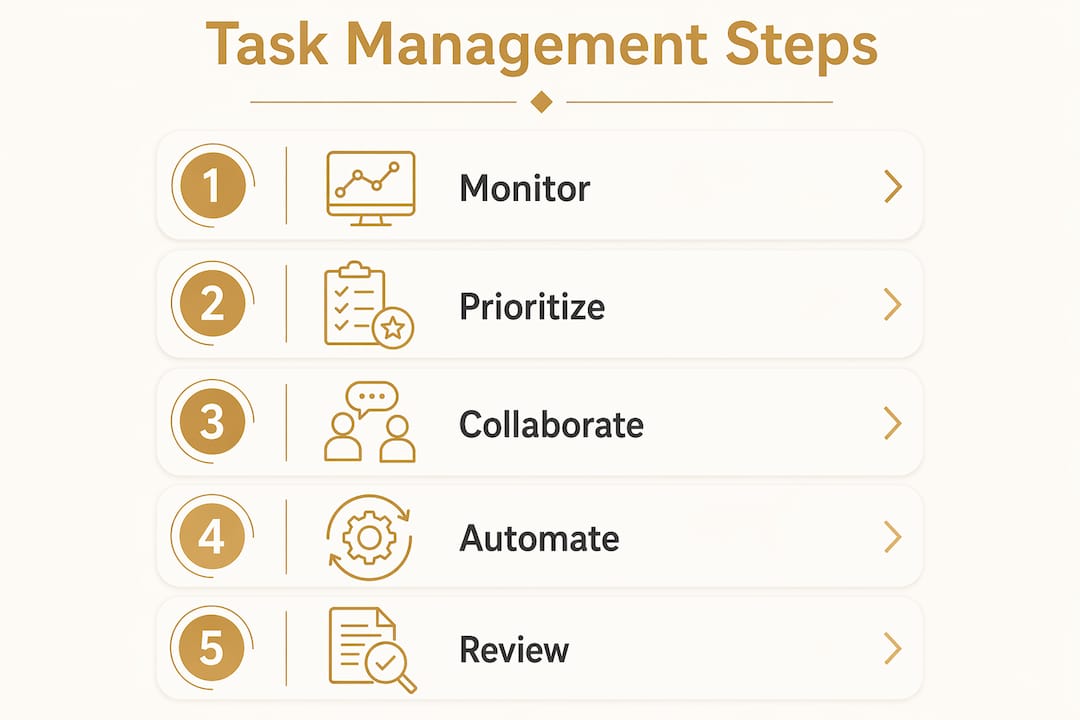
Automatic notifications and reminders keep the team moving without requiring a manager to chase anyone. When a deadline approaches or a dependency completes, the right person gets an alert automatically.

Task assignment with clear ownership means every task has one person responsible for it, with a due date attached. No shared ownership that nobody actually owns.
Collaboration features including comments, file attachments, and @mentions keep all task-related communication in one place. When a question about a task gets answered in the task itself, that context stays with the work permanently.
Workflow automation handles the repetitive work. Recurring tasks, automatic status triggers, and escalation alerts free up time that would otherwise go to manual follow-up.
Resource management tools show workload distribution across the team. A manager can see at a glance who has capacity and who is already stretched, making reallocation decisions faster and more accurate.
Visual project views like Kanban boards, Gantt charts, and calendar views give different perspectives on the same data. Kanban boards work well for tracking task flow; Gantt charts show dependencies and timelines; calendars surface deadline clusters.
Mobile access matters especially for teams that are not desk-bound. Field teams, construction crews, and distributed workers need to update and check tasks from wherever they are working.
Security and permission controls protect sensitive project data. Role-based access means team members see what they need to see, and nothing more. ISO/IEC 27001 is the recognized international standard for information security management, and platforms that align with it give managers confidence that task data is protected.
Pro Tip: Before committing to any platform, run a two-week pilot with one real project. You will learn more about fit from actual use than from any feature checklist.
How to choose and implement a real-time task management system
Choosing the right system starts with an honest look at your team’s actual workflow, not the workflow you wish you had. A five-person team running three projects at once has different needs than a fifty-person team managing complex dependencies across multiple clients.
Assess your team’s real requirements first. Map out how tasks currently move from assignment to completion. Where do things stall? Where does information get lost? Those pain points tell you which features matter most.
Evaluate usability before features. A platform with every feature imaginable that nobody actually uses is worse than a simpler tool the whole team adopts. Look for clean interfaces, short learning curves, and mobile access if your team works in the field.
Check integrations. Your task management tool should connect with the communication and file-sharing tools your team already uses. Forcing people to switch between disconnected apps defeats the purpose of centralization.
Plan for change management. The technology is the easy part. Getting people to actually update tasks in real time requires clear expectations, brief training, and visible buy-in from leadership. If managers do not use the system themselves, the team will not either.
Steps for a clean rollout:
- Start with a pilot project. Pick one active project, configure the tool for it, and run it for two to four weeks before rolling out broadly.
- Set clear update expectations. Decide how often team members should update task status and communicate that standard explicitly.
- Train on the features that matter. Focus on task assignment, status updates, and notifications first. Advanced features can come later.
- Gather feedback early. Ask the team what is working and what is not after the first two weeks. Small adjustments early prevent big frustrations later.
- Review and iterate. After the first full project cycle, look at the data. Did deadlines improve? Did meeting time drop? Use those answers to refine the setup.
Balancing cost with capability is the last consideration. Entry-level tools cover the basics well for small teams. Enterprise platforms add resource management, portfolio views, and advanced analytics, but they also add complexity and cost. Match the tool to where your team is now, with room to grow.
Best practices for getting the most out of real-time task management
Having the right tool is only half the equation. How your team uses it determines whether you see real gains or just add another app to the pile.
Keep task lists clean and current. A task list full of outdated, vague, or duplicate entries is noise. Every task should have a clear title, a single owner, a due date, and a priority level. When tasks are ambiguous, people avoid them.
Encourage frequent, brief updates. The value of real-time visibility depends entirely on people actually updating their tasks. A quick status change takes ten seconds. A status meeting to find out what everyone is working on takes an hour.
Use dashboards actively, not passively. Check the project dashboard at the start of each day. Look for tasks that are overdue, workloads that are lopsided, and blockers that have been sitting unresolved. The dashboard is only useful if you act on what it shows.
Automate the repetitive stuff. Recurring tasks, deadline reminders, and escalation alerts should run without manual intervention. Every minute spent on manual follow-up is a minute not spent on actual work.
Address blockers the moment they appear. When a real-time alert flags a stalled task, treat it as urgent. Blockers compound. A task stuck for one day can delay three others by the end of the week.
Review performance metrics regularly. Most platforms track completion rates, average task duration, and overdue rates. Reviewing these weekly gives you a data-based picture of where your workflow is healthy and where it needs attention.
Recognize contributions visibly. When a team member completes a high-priority task on time, acknowledge it in the platform or in a team channel. Visible recognition tied to real work builds the kind of culture where people stay engaged.
Adapt workflows as projects evolve. A workflow that works in week one may not work in week six as scope changes. Use the data your platform generates to adjust priorities, reassign tasks, and update timelines before problems escalate.
Pro Tip: Set a weekly 15-minute “dashboard review” on your calendar. Treat it as a standing commitment, not an optional check-in. Teams whose managers review dashboards consistently outperform those where the tool is only opened when something goes wrong.
What does research say about real-time task management’s impact on teams?
The evidence for real-time task management’s effect on workload balance and team morale is consistent across multiple studies and operational reports.
Real-time workload visibility gives managers the data they need to redistribute work before anyone hits a wall. Without that visibility, overload builds silently until someone misses a deadline or burns out. With it, a manager can spot the imbalance on a Tuesday morning and fix it before Friday.
In teams without dedicated project managers, the effect is even more pronounced. Team leads using real-time systems act as the critical link between individual contributors and upper management, protecting both productivity and employee well-being. They use live task data to identify bottlenecks, adjust assignments, and keep the team moving without waiting for a formal escalation process.
The morale dimension is worth taking seriously. When team members can see their own contributions in the context of the larger project, they understand why their work matters. That clarity drives engagement in a way that abstract goal-setting rarely does.
| Research area | Finding | Implication for managers |
|---|---|---|
| Workload visibility | Real-time tracking prevents burnout by surfacing overload early | Redistribute tasks before deadlines are missed |
| Bottleneck detection | Live dashboards replace lengthy reports for issue detection | Corrective action happens in hours, not days |
| Coordination overhead | Systematic task management cuts time spent on coordination tasks | More time for productive work, fewer status meetings |
| Team morale | Visualizing contributions boosts engagement and performance | Recognition tied to visible work increases motivation |
| Team lead effectiveness | Real-time systems help leads protect productivity in no-PM environments | Leads can manage workload without formal PM structure |
Key finding: Real-time data dashboards allow managers to detect off-track projects and take swift corrective action without waiting for formal reports, directly reducing the risk of missed deadlines and operational confusion.
The coordination overhead reduction deserves specific attention. Teams that rely on email, spreadsheets, and verbal updates spend a disproportionate share of their time just figuring out what is happening. Real-time task management shifts that time back to actual work by making current status available to everyone without anyone having to ask.
How US-based teams have improved workflows with real-time task management
The shift from manual coordination to real-time task management shows up clearly in how American teams describe the before and after.
Construction and field operations
Field teams face a version of the coordination problem that office teams rarely encounter: workers are spread across a jobsite, often without reliable access to a central office, and task updates happen verbally or on paper. By the time a supervisor knows a task is blocked, half a day may already be lost. Platforms built specifically for field operations, like those developed by Debecorp through its CHERP and SiteComm platforms, address this by bringing real-time jobsite updates directly to the people doing the work. Task status, safety compliance, and daily logs update in real time, so a project manager can see what is happening on the ground without walking the site or waiting for an end-of-day report.
For construction managers specifically, labor productivity tracking tied to real-time task data makes resource allocation decisions faster and more accurate. When you can see which crews are ahead of schedule and which are falling behind, you can shift resources the same day rather than discovering the problem at the next weekly review.
Telecommunications and service delivery
Strencom, an Irish telecommunications company, illustrates what happens when a team managing hundreds of projects abandons email and spreadsheets for a real-time task management platform. Before the switch, task assignments were buried in email threads, project plans went stale immediately, and clients had no visibility into progress. After adopting a centralized task management tool, the team gained live dashboards showing all projects, tasks, deadlines, and team workloads. Clients could log in and check project status directly, reducing client update emails by 70–80%. That is not a marginal improvement. It is a fundamental change in how coordination happens.
Distributed and hybrid teams
For teams working across multiple locations or time zones, real-time task management solves a problem that no amount of video calls fully addresses: the gap between what someone thinks is happening and what is actually happening. A collaborative real-time project management system tested with multiple concurrent users demonstrated consistent task states across all clients with minimal latency, handling many concurrent users simultaneously in a single project room with stable performance. Users reported increased clarity in task delegation and better visibility into project timelines. That kind of system-level reliability is what makes distributed teams function as a unit rather than as a collection of individuals working in parallel.
Risk management in project-heavy environments
Teams managing multiple concurrent projects benefit from real-time monitoring tools that surface risk signals before they become crises. Platforms like Shovld provide real-time data visualization specifically for construction project risk management, giving project leads early warning of conditions that could derail timelines. Pairing that kind of signal intelligence with a task management system that tracks individual work creates a two-layer view: what is happening at the task level, and what risks are building at the project level.
The pattern across all these examples is the same. Real-time visibility does not just make coordination faster. It changes the nature of the manager’s job from reactive firefighting to proactive adjustment.
Key Takeaways
Real-time task management gives managers the live visibility they need to balance workloads, resolve blockers fast, and keep teams aligned without relying on status meetings or manual updates.
| Point | Details |
|---|---|
| Visibility drives better decisions | Live dashboards let managers detect off-track tasks and redistribute work before deadlines are missed. |
| Coordination overhead drops | Systematic task management cuts time spent on status updates, freeing teams for productive work. |
| Accountability requires clear ownership | Every task needs one named owner and a due date to prevent ambiguity and missed commitments. |
| Morale improves with visible contributions | When team members see their work in context, engagement and performance both increase. |
| Pilot before full rollout | Testing on one real project for two to four weeks reveals fit issues before they affect the whole team. |
How Debecorp brings real-time task management to the trades

Debecorp built CHERP and SiteComm from the ground up with input from tradespeople who live the coordination challenges that generic platforms ignore. CHERP handles field operations including time and attendance, daily logs, and safety compliance, all updated in real time and tailored to specific trades. SiteComm keeps teams connected on the jobsite, replacing the verbal updates and paper logs that leave managers guessing.
If you manage a skilled trades team and want task visibility that actually matches how field work happens, explore the CHERP and SiteComm platforms to see how Debecorp approaches real-time task management for the trades.