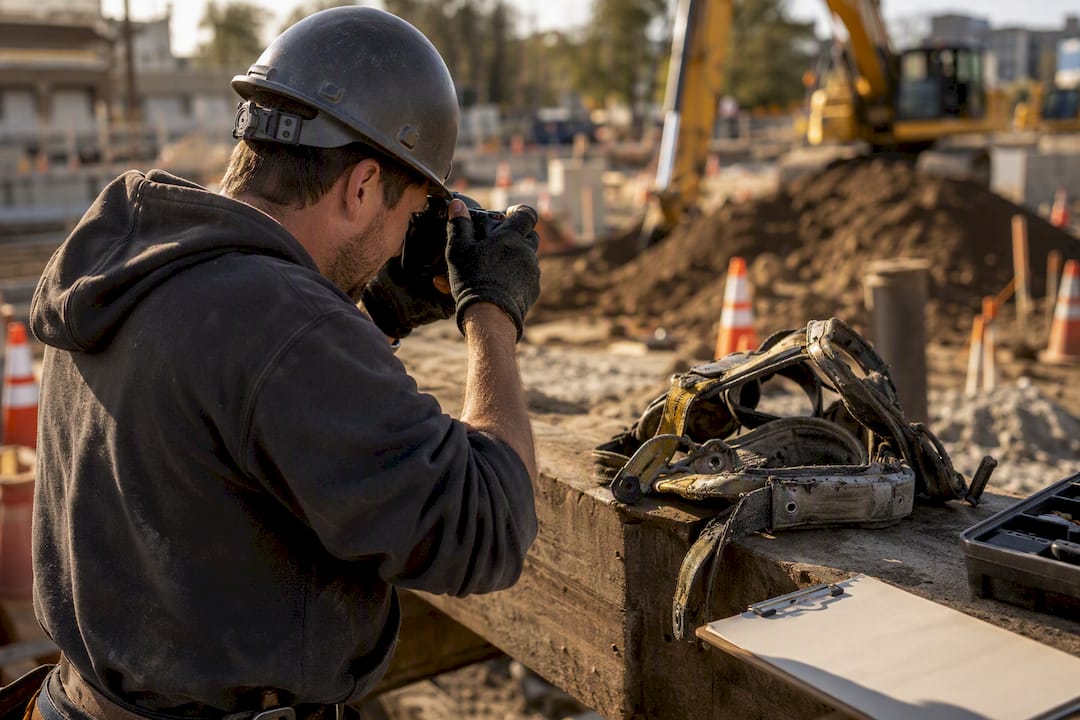
If someone is hurt, call 911 and get first aid moving before anything else. Once the person is stabilized, secure the scene, preserve conditions exactly as they were, and start notifying your chain of command, including OSHA when the injury meets its reporting thresholds under 29 CFR 1904 and 1926. Everything else, paperwork, root-cause analysis, corrective actions come after those three things.
In order, here’s what a supervisor should be doing in the first hour:
- Get medical help and render first aid.
- Secure and isolate the area so nothing shifts or gets removed.
- Notify the GC, site safety officer, and any subcontractor leads involved.
- Start a photo log and jot down a short witness account while memories are fresh.
Pro Tip: A single photo set and a one-paragraph witness summary captured within the first hour will preserve more forensic value than a formal report written three days later. Speed beats polish here.
Key Takeaways
Meeting OSHA’s reporting deadlines depends on acting in the right order: medical response first, evidence preservation second, formal notification third.
| Point | Details |
|---|---|
| Life safety comes first | Call 911 and render first aid before any documentation or notification begins. |
| Know your OSHA clocks | Fatalities require notice within 8 hours; hospitalizations, amputations, or eye loss within 24 hours. |
| Separate facts from analysis | Keep the factual timeline neutral and distinct from root-cause findings and recommendations. |
| Investigate near misses too | Close calls reveal the same hazards as injuries without the complicating factors, act on them early. |
| Digital tools close the gap | Platforms like CHERP and SiteComm timestamp evidence and track corrective actions automatically. |
Table of Contents
- Who to Notify and the Reporting Timelines That Actually Matter
- On-Scene Actions to Preserve Life and Evidence in the First 24 Hours
- Step-by-Step Incident Investigation Workflow
- The Five Things Every Written Incident Report Needs
- Where to Find Official Forms and What a Jobsite Template Should Include
- How Digital Reporting Tools Speed Documentation and Preserve Evidence
- How CHERP and SiteComm Keep Your Incident Reporting Audit-Ready
- Frequently Asked Questions
- Sources
Who to Notify and the Reporting Timelines That Actually Matter
OSHA’s clock doesn’t care how busy your day is. A fatality has to be reported within 8 hours. An in-patient hospitalization, an amputation, or the loss of an eye has to be reported within 24 hours, and that clock starts the moment you, the employer, learn about it, not when the paperwork gets filed.
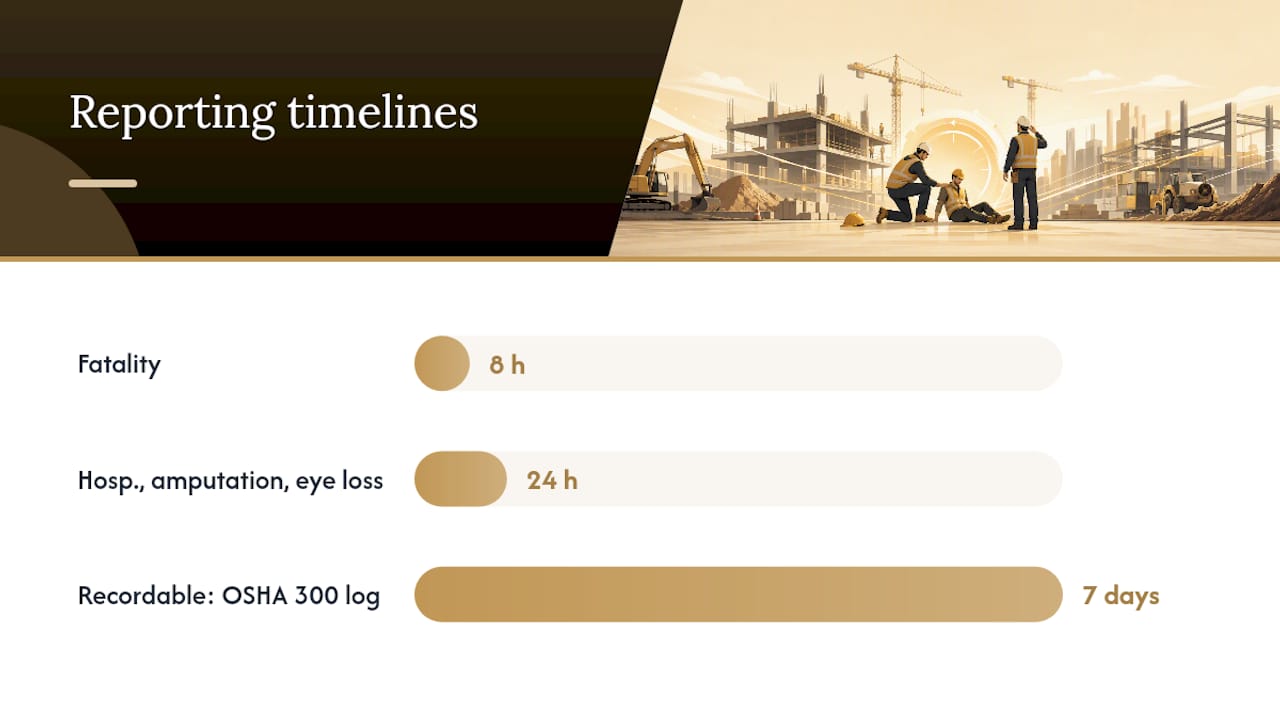
Not every injury triggers that federal call, though. There’s a difference between “recordable” and “reportable.” Recordable incidents go on your OSHA 300 log within 7 calendar days once they meet the criteria under 29 CFR 1904. Reportable incidents are the more serious ones that require the direct call to OSHA.
Beyond the federal layer, most job sites run their own internal clock too:
- Verbal notice to the GC or site safety officer as soon as possible after the incident.
- A written internal report soon after the incident, within the company-required timeframe.
- Any applicable state or local reporting, some states run their own construction incident reporting systems through the DOT or a city buildings department, separate from OSHA.
Here’s the part supervisors often skip: OSHA explicitly recommends investigating near misses, too, not just injuries. A close call usually shows you the same hazard an injury would, minus the paperwork and the pain. Treating it as a throwaway event is how the same hazard eventually puts someone in the hospital.
On-Scene Actions to Preserve Life and Evidence in the First 24 Hours
The sequence matters more than the checklist. Get this order wrong and you either lose evidence or, worse, put someone else at risk.
- Respond to the medical emergency first. Nothing else happens until the injured worker is stable.
- Secure and isolate the area so equipment, materials, and debris stay exactly where they were.
- Preserve physical evidence. Don’t move damaged equipment unless leaving it in place creates a new hazard.
- Photograph everything, wide shots and close-ups, and geotag if your app supports it.
- Preserve any failed components (a snapped rigging point, a cracked scaffold plank) rather than discarding them.
Assign roles before you need them, not during the incident. The first responder handles medical care. The site superintendent runs scene control. A competent person for the relevant discipline (fall protection, excavation, scaffolding) assesses hazards. Someone gets designated as evidence custodian, whoever holds the phone with the photos and keeps the witness statements together.
In that first day, you want: photos, separate written witness statements, equipment IDs and serial numbers, the relevant JHA or permit, and proof of training or certification for anyone involved.
Pro Tip: A simple timed photo log paired with short, separate witness forms beats relying on memory two days later. Timestamped photos and a one-sentence witness summary taken within the hour hold up far better under later scrutiny than a recollection written from memory the next morning.
Step-by-Step Incident Investigation Workflow
Once the scene is stable, the investigation itself follows a fairly predictable arc:
- Secure and triage, confirm nobody else is at risk.
- Collect physical evidence and photos.
- Interview the injured worker (if appropriate) and witnesses separately, not as a group.
- Reconstruct the timeline, minute by minute where possible.
- Run a root-cause analysis, asking “why” repeatedly instead of stopping at the first answer.
- Assign corrective actions with named owners and real deadlines.
- Document findings and distribute the report to everyone who needs it.
OSHA’s own guidance on root-cause analysis pushes supervisors to look past “the worker was careless” and toward systemic gaps, training, procedures, equipment condition, or supervision. That reframe changes what gets fixed.
Corrective actions need owners, not just tasks. A typical assignment table might look like this:
| Corrective Action | Typical Owner | Realistic Deadline |
|---|---|---|
| Retrain crew on fall protection anchor points | GC safety manager | 3 business days |
| Replace or inspect damaged rigging equipment | Subcontractor foreman | 24 hours |
| Update procurement spec for defective PPE | Procurement lead | Next purchase cycle |
Pro Tip: Keep the factual record, who, what, when, separate from your analysis and recommendations. A neutral factual account paired with a distinct analysis section holds up better under legal or insurance review than a report that blends opinion into the facts from line one.
The Five Things Every Written Incident Report Needs
A construction incident report either has these five elements or it’s incomplete, regardless of how long it is:
- Incident facts and timeline, exactly what happened, when, and in what sequence.
- Who was present and their employer, especially important on multi-employer sites where several contractors share the same footprint.
- Conditions and safety controls in place at the time, including PPE, guardrails, or permits.
- Injury and treatment details, plus the recordability determination under OSHA criteria.
- Corrective actions, owners, and due dates, not vague intentions but assigned tasks.
Specificity is what separates a usable report from a liability. Exact location, trade and task involved, the relevant OSHA standard under 29 CFR 1926 when applicable, equipment IDs, and precise injury descriptions all matter more than they seem to in the moment.
Multi-employer sites add a layer most single-employer reports skip. You need to identify which employer created the hazard, which one exposed workers to it, which one had the authority to correct it, and which one was supposed to be controlling the work area. That breakdown drives both your internal corrective actions and how OSHA analyzes citations on shared job sites.
Where to Find Official Forms and What a Jobsite Template Should Include
Start with the official sources rather than reinventing the form yourself. OSHA’s Form 300, 301, and 300A cover the federal recordkeeping side. State DOT and CIR manuals fill in project-specific requirements. A supervisor investigation worksheet gives you a structured field format for evidence and interviews, and printable jobsite forms like TailgateDocs’ incident report template work well as a single-page field document.
A practical one-page template should include:
- Project and site identifiers.
- Event facts (date, time, location, task, equipment).
- A photo checklist so nothing gets skipped.
- Separate witness sections.
- Immediate corrective actions taken on-site.
- OSHA recordability determination.
Keep originals filed with your OSHA logs and workers’ compensation records, retained for the duration OSHA requires for injury and illness records… Save both a printable copy for the field and a timestamped digital version for your records.
How Digital Reporting Tools Speed Documentation and Preserve Evidence
Paper forms get lost, coffee-stained, or filled out three days late from memory. Digital reporting closes that gap. Capturing an incident in a field app timestamps the photos automatically, attaches GPS metadata, and notifies safety leads the moment the entry is submitted, not whenever someone gets back to the trailer.
A typical digital workflow looks like this: a supervisor captures the incident in the field, photos and location data attach automatically, safety leads get notified in real time, corrective tasks get assigned with due dates, and the whole package exports as a compliant record for an OSHA inspector or insurance adjuster.
Platforms built specifically for the trades, like CHERP and SiteComm, centralize daily logs, safety reports, and follow-up tracking in one place instead of scattering them across text threads and paper clipboards.
- Set an internal policy requiring phone-captured photos to upload to the secure incident record within a defined window, ideally under an hour.
- That single habit protects your chain of custody better than almost anything else you can do procedurally.
Pro Tip: Chain of custody isn’t just a legal term for court cases. It’s the difference between a photo an insurer trusts and one they question.
Field Lessons: What Safety Managers Get Wrong
The most common mistakes are rushing witness interviews, moving evidence before it’s documented, and jumping straight to blaming the worker. None of that helps. What actually prevents recurrence is boring and consistent: an immediate photo log, separate written witness statements taken apart from each other, and a quick JHA update before the crew goes back to work. Keep the language factual and neutral. You’re documenting a fix, not building a case against someone.
How CHERP and SiteComm Keep Your Incident Reporting Audit-Ready
Debecorp built CHERP and SiteComm around the exact problem this article walks through: getting from “something happened” to a documented, defensible record before details fade or deadlines slip.

A supervisor captures the incident on-site, photos and GPS data attach automatically, safety leads get notified instantly instead of hours later, and corrective actions get assigned with real due dates that someone actually tracks. When it’s time to hand over a package to an OSHA inspector or an insurance adjuster, it exports in one file instead of getting assembled from three different phones and a paper folder. That’s the practical edge over relying on group chats and handwritten forms: nothing sits buried in someone’s camera roll waiting to be remembered.
Because CHERP and SiteComm were built with input from tradespeople who’ve actually run these investigations, the workflow matches how a job site really moves, not how a compliance department imagines it should. If your current process depends on remembering to text a photo to the right person, check out the CHERP and SiteComm platforms and see how a centralized system changes what your next incident report looks like.
Frequently Asked Questions
What counts as a reportable incident versus a recordable one? A reportable incident, a fatality, in-patient hospitalization, amputation, or loss of an eye, requires a direct call to OSHA within a strict timeframe. A recordable incident meets lower-severity criteria and gets logged on your OSHA 300 log within 7 calendar days instead.
Can a worker report a safety concern without their employer knowing? Yes. Workers can file a confidential complaint directly with OSHA and are protected from retaliation for doing so.
Do near misses really need a full investigation? They benefit from one. A near miss shows the same underlying hazard as an injury would, without the added complications of medical treatment or litigation, making it easier to find the root cause early.
How long should incident records be kept? Retain incident documentation alongside your OSHA injury and illness records for at least five years following the year they cover.
What’s the biggest documentation mistake supervisors make? Waiting too long to capture photos and witness statements. Details fade fast, and a report written from memory two days later carries far less weight than one built from timestamped evidence taken within the first hour.
Sources
Keep these on hand for the moments a checklist isn’t enough. OSHA’s incident investigation overview covers the legal timeline and root-cause expectations. Workers can file a confidential complaint with OSHA without fear of retaliation, and whistleblower protections back that up federally. For forms, the Harvard EHS supervisor worksheet and TailgateDocs’ printable template both give you field-ready starting points. Check your state DOT or local buildings department too, since reporting rules can go beyond what OSHA requires.
- Incident Investigation - Overview | Occupational Safety and Health Administration
- How to Write a Construction Incident Report - LegalClarity
- Free Incident Report Form (Printable) | Construction
- Construction Supervisor Accident or Incident Investigation …