
A proper construction team messaging setup is not just a tech decision. It is a legal and operational one. Done right, it means every directive, safety update, and schedule change lives in a centralized, company-owned system, not scattered across personal phones in a dozen private group chats. Done wrong, it means costly disputes, lost project records, and communication that walks out the door when a key employee does.
The core components of an effective setup include:
- Organization-level access permissions with defined admin roles
- Project-specific and trade-specific chat groups to keep conversations organized
- Clear communication protocols specifying what belongs in the platform versus a phone call or formal notice
- Software built for construction, capable of integrating with your existing project management tools
- Onboarding and training to drive consistent adoption across the field
The goal is a system your whole team actually uses, where nothing critical gets lost.
Table of Contents
- How to set up your construction team messaging system
- Why informal messaging puts your construction business at legal risk
- Best practices that make your messaging system actually work
- How CHERP and SiteComm put these principles into practice
- Debecorp gives construction managers a purpose-built path forward
- Key Takeaways
How to set up your construction team messaging system
A solid messaging setup follows a sequence. Skipping steps, especially the permissions and protocol stages, is how teams end up with the same fragmented communication problems they were trying to fix.
-
Configure organization-level access permissions. Start at the admin level before you create a single group. Define who can create channels, who can edit or delete messages, and set time limits on message editing to preserve record integrity. According to Procore’s setup guidance, admins should customize these granular settings first, then build out the group structure on top of them.
-
Create project-specific and team-specific groups. Each active project should have its own channel. Within large projects, break it down further by trade or crew. A concrete crew does not need to wade through electrical RFIs, and vice versa. Keep the structure logical and consistent across projects so new team members know exactly where to look.
-
Define your communication protocols. Decide what types of messages belong in the platform. Safety alerts, schedule updates, and daily logs go here. Informal banter can stay here too, but formal contract notices, change order approvals, and legal directives need a separate, documented channel. Write these rules down and distribute them before launch.
-
Select software built for construction teams. Consumer apps are not the answer. You need a platform that integrates with your jobsite communication tools, supports document attachment, and keeps data under company ownership. The platform should also produce auditable message logs, not just a chat history someone can delete.
-
Train and onboard your team. Adoption is where most setups fail. Run a short orientation session for foremen and crew leads. Show them exactly how to find their project group, post an update, and attach a photo or document. Make it practical, not a lecture.
Pro Tip: Pilot the setup on one project before rolling it out company-wide. One project reveals the group structure problems, the protocol gaps, and the training needs you did not anticipate. Fix them at small scale before they become organization-wide habits.
Why informal messaging puts your construction business at legal risk
The legal exposure tied to informal messaging is real and growing. Courts increasingly treat text messages and group chats as binding evidence of notice, directives, or contract changes. According to ConsensusDocs and NASBP analysis, informal digital communications have triggered costly construction disputes precisely because they look like casual conversation but carry legal weight.
The core problem: A foreman texts a subcontractor to proceed with a scope change. No formal change order follows. The subcontractor does the work. Later, the owner disputes the cost. That text message is now exhibit A in an arbitration hearing, and neither party is happy about it.
The specific risks your team faces with consumer apps include:
- Data ownership gaps. Consumer messaging apps like WhatsApp store data on personal accounts. When an employee leaves, that project history goes with them.
- No version control. Informal apps create scattered data with no single source of truth, making it nearly impossible to reconstruct a clear approval chain.
- Message deletion risk. Individual users can delete messages on most consumer platforms, wiping out records that could be critical in a dispute.
- Contract notice ambiguity. Informal messaging contributes to confusion over official approvals, raising the risk of rework, safety hazards, and unresolved scope disputes.
- Discovery costs. Extracting and preserving messages from personal devices during litigation is expensive and often incomplete.
Permit compliance is another area where poor communication creates compounding problems. Contractors who use informal channels for permit coordination frequently miss submission requirements, a risk detailed in common permit mistakes that stem directly from fragmented team communication.
Best practices that make your messaging system actually work
Setting up the platform is step one. Getting your team to use it consistently, and use it correctly, is the harder part.
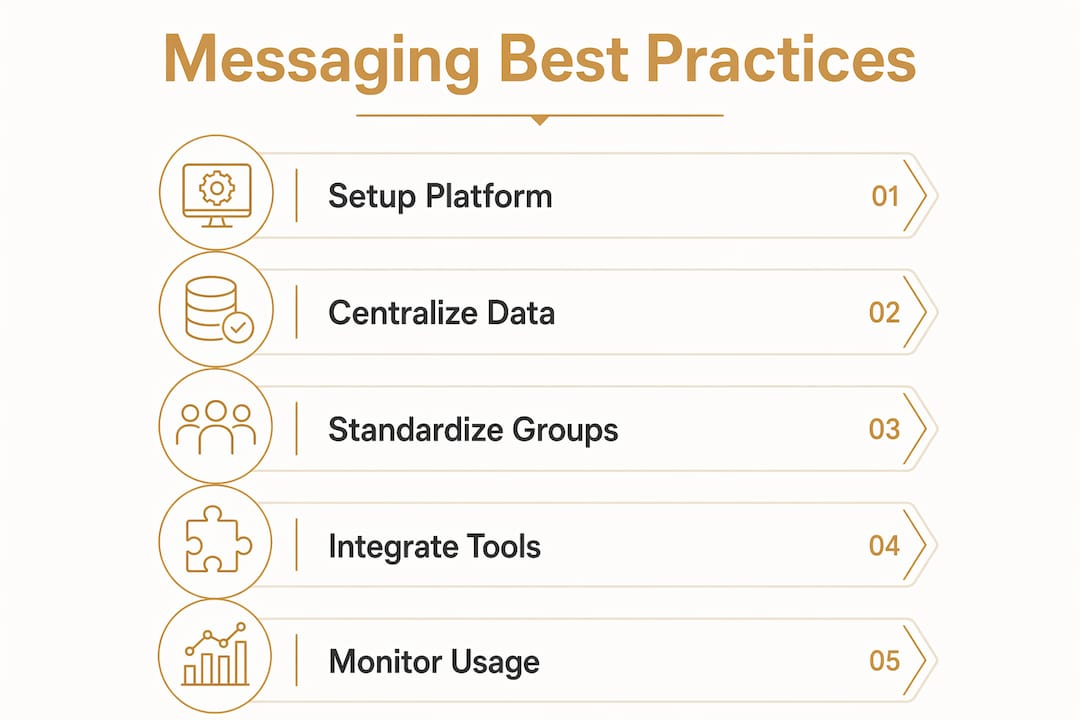
Centralize operational data in the platform. Safety alerts, daily logs, schedule changes, and inspection results should all live in the messaging system, not in a foreman’s personal inbox. When critical data is centralized, it is accessible to the whole team and preserved for the record.

Eliminate person-dependent communication. If your project communication lives in a private group chat that a superintendent controls, you lose that history the day they leave. Company-owned platforms prevent this. The risk of losing project history when key personnel depart is one of the most underestimated operational vulnerabilities in construction.
Standardize group structures across projects. Use the same naming conventions and channel categories on every job. When a crew lead moves from one project to another, they should not have to relearn where to find safety updates or daily logs.
Integrate with your project management tools. A messaging platform that does not connect to your scheduling, document control, or RFI systems creates a new silo instead of eliminating one. Look for platforms with native integrations or open APIs. Guidance on centralizing team updates covers this in more depth.
Implement data retention policies. Decide upfront how long messages and attachments are retained. Many states have specific requirements for construction project records. Your platform settings should reflect those requirements, not default to whatever the vendor chose.
Monitor usage and adjust. Pull usage reports monthly for the first quarter after launch. Low activity in a project channel usually means the team defaulted back to text messages. Address it with targeted retraining, not a company-wide memo.
How CHERP and SiteComm put these principles into practice
Debecorp built CHERP and SiteComm from the ground up with direct input from tradesmen, not from software developers guessing at what field workers need. That distinction matters in practice. Most field communication tools are adapted from office software. CHERP and SiteComm were designed for the trades from the first line of code.
Key features that reflect the best practices outlined above:
- Centralized field operations data, including time and attendance, daily logs, and safety compliance, all within a single platform
- Trade-specific configuration so the platform fits the actual workflow of electricians, pipefitters, ironworkers, and other skilled trades rather than forcing them into a generic interface
- Communication protocol enforcement built into the platform structure, reducing the chance that critical updates get buried in informal side conversations
- Auditable communication histories that protect the company in disputes and support compliance requirements
- User-centric design that drives adoption among field workers, not just office staff
“What sets DeBe apart is its commitment to building these platforms from the ground up, directly informed by tradesmen who understand the challenges firsthand. This user-centric approach not only enhances productivity but also fosters a sense of belonging among skilled workers.” — DeBe Corporation
The role of group messaging in construction teams goes beyond convenience. When the platform is built for the trades, workers actually use it, which means the data is there when you need it, whether for a safety audit, a dispute, or a project handoff. Foreman-level adoption is particularly critical, and foreman communication tools designed for field conditions make that adoption far more likely than generic apps.
Debecorp gives construction managers a purpose-built path forward
Fragmented communication costs construction teams time, money, and legal exposure. CHERP and SiteComm address all three by replacing the patchwork of consumer apps and informal channels with a single, trade-informed platform.

CHERP handles the field operations layer: time and attendance, daily logs, safety compliance, all structured around how skilled trades actually work. SiteComm handles the communication layer, keeping project messaging centralized, auditable, and company-owned. Together, they give construction managers the kind of field software for the trades that was built by people who have stood on a jobsite, not just studied one from a conference room.
If your team is still running project communication through personal phones and consumer apps, the fix is not a policy memo. It is a platform built for this work. See what CHERP and SiteComm can do for your operation at debecorp.com/product.
Key Takeaways
A professional construction team messaging setup requires company-owned platforms, defined permissions, project-specific groups, and clear protocols to protect both operations and legal standing.
| Point | Details |
|---|---|
| Start with permissions | Configure admin roles and message-editing limits before creating any groups. |
| Eliminate personal-app risk | Consumer apps create data ownership gaps and legal exposure that company-owned platforms prevent. |
| Standardize across projects | Consistent group structures and naming conventions reduce confusion when crews move between jobs. |
| Retain and monitor data | Set retention policies aligned with state requirements and review usage monthly after launch. |
| Debecorp’s CHERP and SiteComm | Purpose-built for skilled trades with direct tradesmen input, centralizing field ops and communication in one auditable platform. |