
The reliable way to alert crews to physical site changes is a pre-configured, multi-channel mass-notification system that tracks per-recipient delivery and escalates automatically when someone doesn’t acknowledge. Consumer group chats won’t cut it. What you need is simultaneous delivery across push, SMS, email, and voice, tied directly to pre-built response plans so the right people act, not just read.
Four capabilities are non-negotiable:
- Multi-channel simultaneity: push, SMS, email, and voice fire at the same time, not sequentially
- Per-recipient delivery and acknowledgement tracking: the system knows who got it and who confirmed
- Automatic escalation: unacknowledged recipients trigger a follow-up to them or their backup contact
- Pre-built templates tied to response plans: alerts activate tasks, not just awareness
Start here: map the site into named zones and build your contact groups before the first subcontractor walks through the gate.
Key Takeaways
Reliable site alerting requires simultaneous multi-channel delivery, per-recipient acknowledgement tracking, automatic escalation, and pre-built templates tied to response plans, all configured before the first crew arrives.
| Point | Details |
|---|---|
| Map zones before mobilization | Define named site zones and assign local responders before any subcontractor arrives. |
| Pre-register every contact at induction | Load all workers, subcontractor operatives, and visitors into the database at the gate, not during an incident. |
| Configure templates and ack windows | Build pre-approved templates per incident type with escalation windows (e.g., 60 seconds for medical). |
| Test end-to-end before go-live | Validate delivery, acknowledgement, escalation, response-plan activation, and the audit trail in a full drill. |
| Debecorp CHERP and SiteComm | Provide the multi-channel delivery, zone targeting, live dashboard, and pre-built templates required for construction site alerting. |
Table of Contents
- Why consumer messaging apps can’t keep up with a busy jobsite
- What a jobsite mass-notification system must actually do
- How to configure an alerts-and-response workflow on your site
- Ready-made alert templates, acknowledgement windows, and escalation flows
- How to test the system and run drills that prove it works
- Typical rollout stages and the main cost drivers
- How CHERP and SiteComm map to what your site actually needs
- What field experience actually teaches you about site alerting
- Get started with CHERP and SiteComm
- Sources
Why consumer messaging apps can’t keep up with a busy jobsite
WhatsApp and group chat were built for conversation. They were not built for life-safety acknowledgements, and the gap shows fast on a complex site.
The failure modes stack up quickly:
- Message noise: a safety-critical alert competes with lunch orders and weekend plans in the same thread
- Silent phones: a worker with their phone on vibrate in a loud environment never sees the message
- No delivery or ack tracking: you have no way to know who actually read it
- Sequential delivery: some platforms send one message at a time, meaning the last person on the list gets the alert minutes after the first
- No automatic escalation: if someone doesn’t respond, nothing happens unless a human notices
Field-to-office coordination breakdowns are a leading driver of rework and delays on construction sites. A missed schedule change or unacknowledged stop-work order compounds that risk immediately.
Pro Tip: Don’t pick one channel and call it done. Push notifications reach smartphone users fast but fail on dead-battery or no-data devices. SMS gets through on basic cell coverage but can be delayed under network load. Voice calls break through noise and silent-mode settings. Email creates a paper trail. Run all four simultaneously so each channel’s failure mode is covered by the others. A guide to jobsite communication channel selection can help you match channels to your specific site hazards.
What a jobsite mass-notification system must actually do
A credible construction mass-notification system delivers alerts simultaneously via push, SMS, email, and voice; tracks delivery and acknowledgement per recipient in real time; and escalates automatically to unacknowledged recipients or their backup contacts. That’s the floor. Here’s what the full spec looks like:
- Simultaneous multicast delivery across all four channels with no sequential queuing
- Per-recipient audit trail: timestamp of send, delivery confirmation, and acknowledgement logged individually
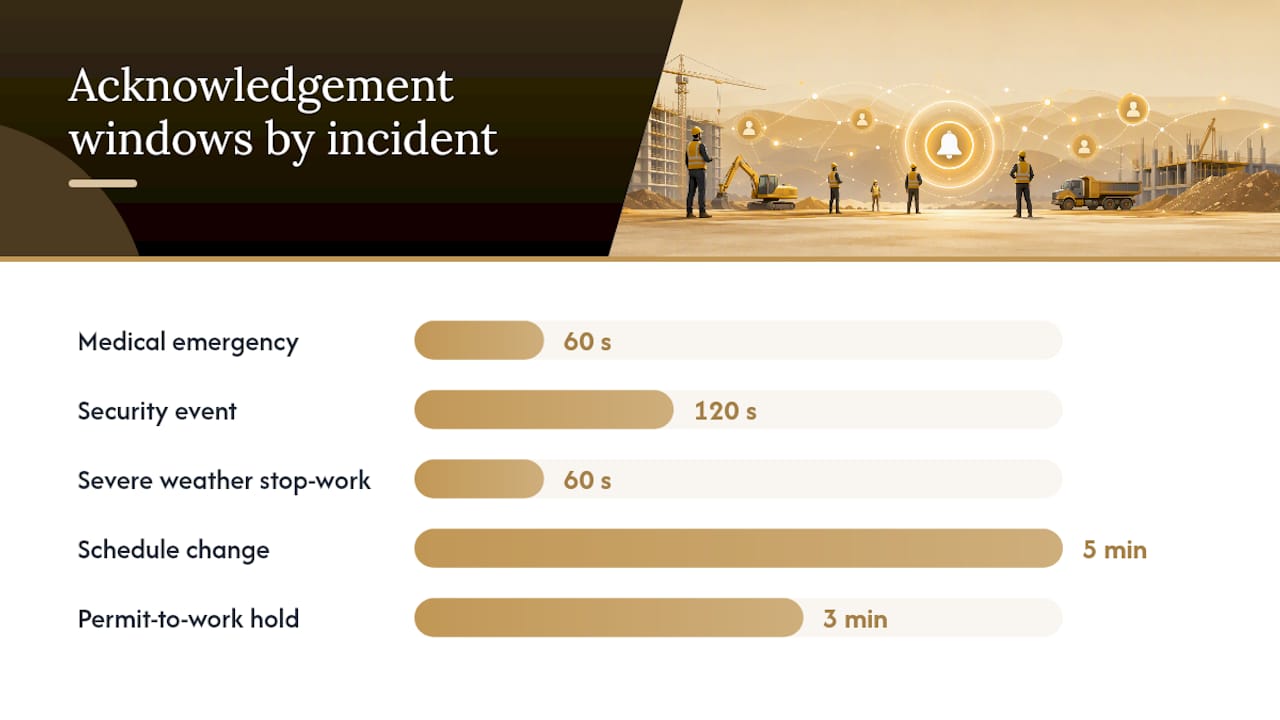
- Configurable escalation rules: set the window per incident type (60 seconds for medical, 120 seconds for a security event) and define who gets the escalation
- Contact database covering everyone: workers, subcontractor operatives, visitors, and client reps, all pre-registered
- Role-based and zone-specific groups: target all crews site-wide, a single zone, a specific trade, or one employer’s team from a single send
- Pre-built templates per incident type: each template attaches the correct recipient list and response plan automatically
- Response-plan integration: alerts activate named tasks and assign them to specific roles, not just broadcast a message
- Roll call and accountability: the system tracks who has checked in and flags who hasn’t
- Message queueing for offline devices: alerts queue and deliver when connectivity returns
- API integration points: connect to daily logs, permit-to-work systems, and incident management tools
Centralizing site data into a single source of truth reduces miscommunication and keeps field information usable by safety teams and the back office. An alert system that sits in a silo defeats that purpose.
How to configure an alerts-and-response workflow on your site
Communication planning should begin at the risk-assessment stage, before work starts and before any subcontractor arrives. Here’s the sequence:
- Risk mapping and zone definition: walk the site, identify hazard zones, and name them (e.g., “Tower Crane Radius,” “Excavation Zone B”). Assign a local responder to each zone.
- Signal coverage survey: test mobile signal at every zone boundary. Mark dead spots on the site map and document them.
- Group and role definitions: build contact groups for site-wide alerts, zone-specific alerts, role-based alerts (foremen, safety officers, subcontractor leads), and employer-specific lists.
- Subcontractor pre-registration during induction: add every operative, visitor, and client rep to the database at the gate, not during an incident. Pre-registering subcontractor teams during induction means alerts never require manual audience construction under pressure.
- Template creation: build a template for each credible incident type. Each template should pre-select the recipient group, the response plan, and the acknowledgement window.
- Acknowledgement thresholds and escalation rules: configure per incident type. Medical events need a shorter window than a schedule change.
- Response plan attachments: link each template to the tasks that activate on send (e.g., “Notify site medic,” “Secure crane radius,” “Log incident in daily report”).
- Device and access checks: confirm every worker has the app installed, notifications enabled, and a backup contact registered.
- Training and drill schedule: plan at least one full end-to-end drill before go-live and quarterly thereafter.
- Go-live criteria: 100% of contacts loaded, all templates tested, all escalation paths verified, and signal dead spots documented with a physical backup in place.
Pro Tip: For zones with no reliable mobile signal, designate a local responder with a two-way radio and a printed emergency contact card. Document the physical backup protocol in the site communication plan and test it in every drill. Don’t assume the app will reach everyone.
Ready-made alert templates, acknowledgement windows, and escalation flows
Write every alert short, location-specific, and action-oriented. The message should answer three questions in under 20 words: what happened, where, and what the recipient must do right now.
Here are five template types to build first:
- Schedule change (all crews): “Work on Level 3 suspended until 14:00. Report to site office for revised assignments. Acknowledge.”
- Medical emergency: “Medical emergency at Excavation Zone B. Designated first aider respond immediately. All others clear the area.”
- Severe weather stop-work: “Stop-work order: high wind warning active. Secure all materials and evacuate to muster point Alpha.”
- Material delivery change: “Concrete pour rescheduled to 07:00 tomorrow. Pump crew and rebar team: confirm attendance by 17:00 today.”
- Permit-to-work hold: “Hot work permit suspended in Mechanical Room 2. All hot work must cease immediately. Contact safety officer.”
| Incident type | Suggested ack window | First escalation | Secondary escalation |
|---|---|---|---|
| Medical emergency | 60 seconds | Site safety officer | Site manager + emergency services |
| Security event | 120 seconds | Security lead | Site manager |
| Severe weather stop-work | 60 seconds | Zone foreman | Project manager |
| Schedule change | 5 minutes | Crew foreman | Superintendent |
| Permit-to-work hold | 3 minutes | Safety officer | Project manager |
Keep templates version-controlled and pre-approved by the safety officer before they go live. A template edited during an incident is a liability.
How to test the system and run drills that prove it works
Sending a message is not a test. A real test validates reach, acknowledgement, escalation, response-plan activation, and the audit log, in that order.
- Full-contact test: send a non-emergency test alert to every contact in the database. Confirm delivery and acknowledgement rates meet your threshold before go-live.
- Zone-specific test: isolate one zone group and confirm only that zone receives the alert.
- App-off and silent-device test: have several workers disable notifications or turn phones to silent. Confirm SMS and voice channels still reach them.
- Escalation simulation: let a test alert go unacknowledged and confirm the escalation fires within the configured window.
- Roll-call simulation: trigger a muster-point drill and confirm the system tracks check-ins and flags missing personnel.
- Response-plan activation check: confirm that sending the template automatically creates the correct tasks and assigns them to the right roles.
Acceptance criteria: delivery confirmation for all contacts, escalation firing within the configured window, correct task assignment in the response plan, and a complete audit trail with timestamps. Retest after any major site change (new subcontractor mobilization, zone reconfiguration, or significant crew turnover) and run a full drill at least quarterly.
Typical rollout stages and the main cost drivers
Rollout is phased: pilot zone first, then site-wide, then multi-site, with training and integrations running in parallel.
| Phase | Typical duration | Key activities |
|---|---|---|
| Planning and site mapping | 1–2 weeks | Zone definition, signal survey, group design |
| Contact onboarding and induction | 1–2 weeks | Pre-registration, device checks, access setup |
| Template creation and testing | 1 week | Build templates, configure escalation rules |
| Pilot drill | 1–3 days | End-to-end test in one zone, review results |
| Full site deployment | 1–2 weeks | Roll out to all zones, train all foremen |
Primary cost drivers to budget for:
- License seats: per-user or per-site pricing depending on the platform
- SMS and voice delivery volume: high-frequency sites with large crews accumulate message costs quickly
- Integration engineering: API connections to permit systems, daily logs, or HR databases require development time
- Hardware for dead zones: two-way radios, signal repeaters, or satellite devices for areas with no mobile coverage
- Training time: foreman and admin onboarding, plus recurring drill time
- Ongoing admin: contact database maintenance as crews rotate on and off site
Enterprise licensing across multiple sites typically reduces per-site cost. Budget an integration sprint early if you’re connecting to an existing project management or safety platform.
How CHERP and SiteComm map to what your site actually needs
CHERP and SiteComm provide the multi-channel delivery, contact grouping, pre-built templates, and response-plan integration required for reliable site alerting. Here’s how the spec maps to the platforms:
- Contact database and subcontractor pre-registration: CHERP manages crew hierarchy, role-based admin, and per-trade profiles so every operative is in the system before work starts
- Zone targeting: SiteComm supports site mapping and zone-based notification so you can target a single area without broadcasting to the whole site
- Multi-channel simultaneous delivery: alerts go out across push, SMS, email, and voice at the same time
- Per-recipient acknowledgement tracking: a live incident dashboard shows delivery and acknowledgement status per person in real time
- Auto-escalation rules: configure escalation windows per incident type; the system handles follow-up automatically
- Pre-built, pre-approved incident templates: the template library covers common incident types with pre-attached recipient lists and response plans
- Roll call and response-plan task assignment: SiteComm activates named tasks on alert send and tracks accountability through to resolution
- Audit trail and reporting: every send, delivery, acknowledgement, and escalation is logged with timestamps for post-incident review
Debecorp’s real-time jobsite updates guide walks through how to configure contact groups, templates, and end-to-end test procedures that match these capabilities directly.
What field experience actually teaches you about site alerting
The technology is the easy part. The hard part is the discipline to maintain it.
Every site I’ve seen struggle with notification failures had the same root cause: the contact database was out of date. A subcontractor rotated crews, nobody updated the system, and the alert reached the wrong people or nobody at all. The fix isn’t a better platform. It’s a standing rule that no new operative starts work until they’re registered and their device is confirmed.
Two other rules that matter more than most supervisors expect: first, run a drill within the first week of any new subcontractor mobilization, not just at go-live. New crews don’t know the muster points, the zone names, or the escalation contacts. A drill surfaces that gap before an incident does. Second, collect feedback after every drill. Workers will tell you which channel reached them first, which one they almost missed, and whether the template language was clear. That feedback loop is how you tighten the system over time, and it costs nothing.
Software records decisions. Conversation makes them. A formal communication plan names who talks to whom, through which channel, and who has authority to call a stop-work. The platform enforces it. Both matter.

Get started with CHERP and SiteComm
The fastest path to a tested, site-ready notification system is a structured pilot with Debecorp. A typical pilot covers one zone, walks your admin through site mapping and contact onboarding, imports a starter template library matched to your incident types, and runs an end-to-end drill before you expand site-wide.

Most pilot setups reach go-live within two to three weeks from first contact. The CHERP and SiteComm platforms are built specifically for the skilled trades, so the configuration reflects how construction sites actually operate, not how a generic enterprise software team might have imagined. Request a demo or pilot through the product page and tell the team your site size, crew count, and the incident types you need to cover first.
Sources
The following sources informed this guide and are worth consulting for deeper reading or verification.
- Mass Notification System for Construction Industries
- Construction Site Communication Guide for Managers
- How to Improve Communication on Construction Jobsites
- 9 Ways to Improve Field-to-Office Communication in Construction